
Stop leaving retention money on the table
Retentions are now built into WorkGuru: retention worked out on every progress claim, release dates tracked for you, and one dashboard showing what you’re owed across every job.
On a construction job, retention is often your margin. Five per cent held on every claim, released months after practical completion, adds up to real money on every project you finish.
Yet for most contractors, it lives in a spreadsheet someone updates when they remember. Release dates slip past. A defects-period release sits unclaimed for months. Nobody notices until the end of the year, or not at all.
With WorkGuru’s new Retentions feature, that money is tracked from the first progress claim to the final release, inside the same system you already quote, schedule and invoice from.
Why we built it
When we talked to construction and fit-out businesses about retention, the same problems came up again and again:
- Claims get missed. Release dates depend on practical completion and defects periods that are tracked somewhere else, if at all. When nobody is watching the calendar, retention you’re entitled to simply isn’t claimed.
- The maths is fiddly. Contracts hold different percentages at different stages, cap the total, and release it in tranches. Working that out by hand on every progress claim invites errors.
- There’s no single view. Ask “how much retention are we owed across all our jobs?” and someone has to open a dozen spreadsheets to answer.
- Invoices and records drift apart. Retention is typed onto invoices by hand, then tracked separately, and the two never quite agree.
We wanted retention to be something WorkGuru simply handles, the same way it handles your quotes, timesheets and invoices.
Retention worked out on every claim, automatically
Set a project’s retention terms once, and every progress claim from then on is right.
-
Automatic calculation on the invoice. When you invoice a project, WorkGuru adds the retention line for you. It works out the amount from the project’s terms, what’s already been claimed and what’s already held, after any discounts or surcharges. The line stays editable, so if a client agrees something different on one claim, you change the figure and WorkGuru keeps track.
-
Multiple bands, the way your contracts are written. Many contracts hold one rate early in the job and a lower rate later: 10% on the first $200,000 claimed, then 5% after that. WorkGuru supports as many bands as your contract needs and applies each one only to the part of the claim it covers, like tax brackets.
-
Caps that hold. Set a maximum retention for the project, as a dollar amount or as a percentage of the contract value. As claims approach the cap, WorkGuru reduces the retention it suggests, and warns you if an invoice would take the project over.
-
Schemes for the contracts you use most. Save your standard terms (bands, cap and release schedule) as a scheme, and apply it to a new project in one click.
-
Group invoices and workflows included. Invoicing a whole project group holds the right retention against each project, and invoices created by your workflows add it too.
Never miss a release date again
Retention is only worth something if you claim it back. WorkGuru now watches the dates for you.
-
Release dates worked out automatically. Each project has a release schedule: for example, half at practical completion and half twelve months later. Enter the practical completion date, or simply complete the project, and WorkGuru dates every release. Move the completion date and the release dates move with it.
-
Due and overdue, checked every day. Once a release date passes, that retention shows as due now on the project and on the dashboard. If it stays unclaimed past the number of days you choose, it’s flagged as overdue.
-
Reminders that reach the right person. A new Retention Due workflow trigger lets you act on release dates automatically: a to-do for the project manager a week before, an email on the day, a chaser two weeks after. Reminders only go out when there is actually money to claim.
-
Protection against double claims. WorkGuru won’t let a project release more retention than it holds. If two people raise a claim for the same retention, the second is refused before it’s approved, and credit notes that reverse retention are checked the same way.
Retentions · Beta
Ready to Stop Chasing Retention by Spreadsheet?
Retentions are available now in beta. Get in touch and our support team will turn it on for your account.
One dashboard for every job
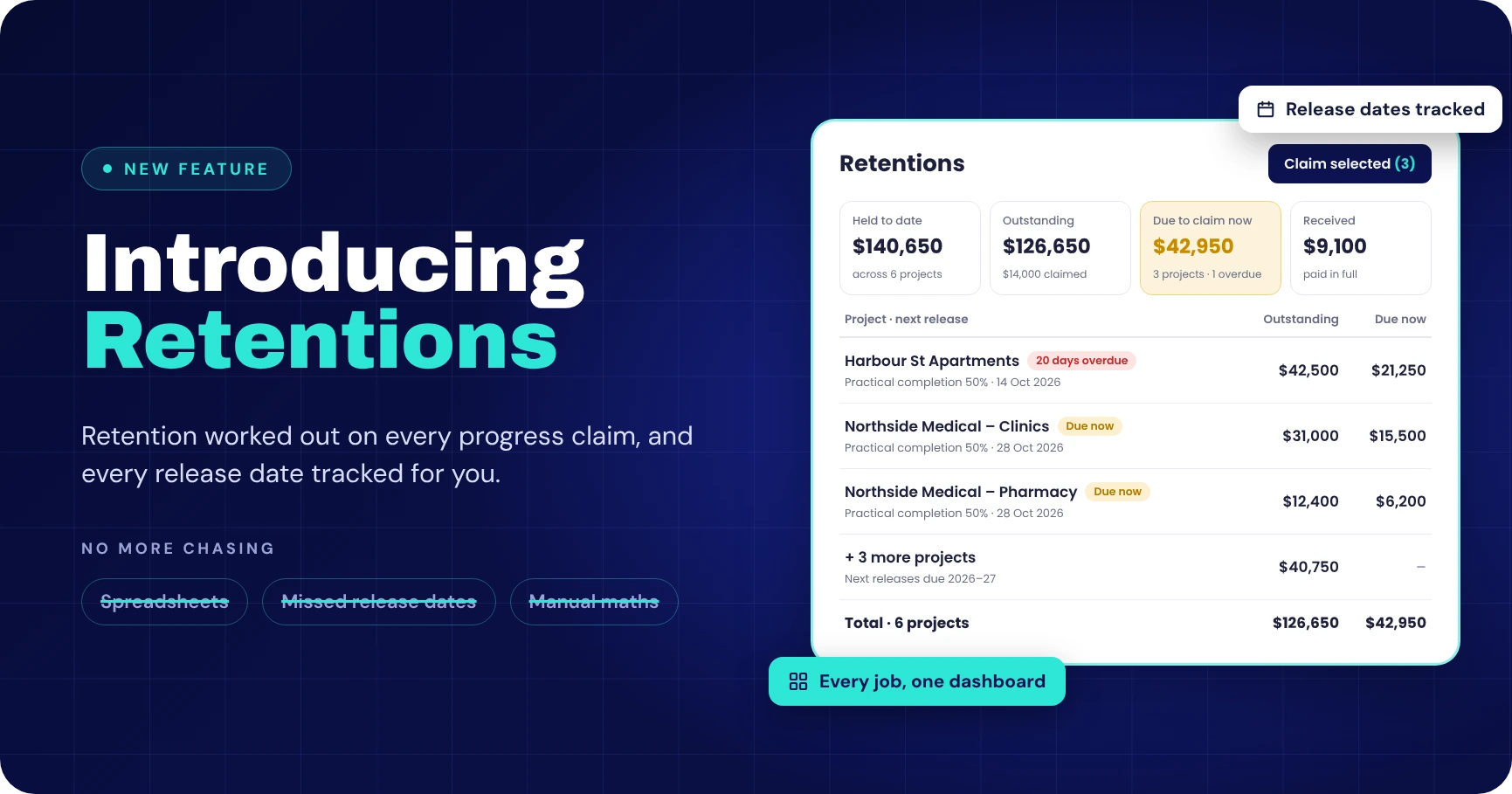
The new Retentions dashboard answers the question every finance team asks: how much are we owed, and what can we claim today?
- Four numbers at the top: retention held, claimed, outstanding, and due to claim now, with how many projects are overdue.
- Every project in one list, with its scheme, cap, what’s held, claimed and outstanding, and when the next release falls due. Projects in a group sit together with a subtotal.
- Filters that get you straight to the work: search by job, client or group, and switch on Outstanding only or Due now only.
- Export the whole list to a spreadsheet for your accountant or month-end reporting.
Claim in bulk, in a few clicks. Tick the projects you want, click Claim selected, and choose how much to claim on each: what’s due under the release schedule, the full outstanding amount, or a percentage. WorkGuru creates draft invoices, one per project or one per project group, ready for you to check and send.
Every project also has its own Retention section, with a full ledger of every claim that held or released retention. When a client asks how a figure was reached, the answer is one click away.
How it works on a real job
Take a $400,000 fit-out with these retention terms: 10% on the first $200,000 claimed, 5% after that, capped at $25,000, released half at practical completion and half twelve months later.
Progress claims
| Claim | Claimed this time | Claimed to date | Retention held this claim | Held to date |
|---|---|---|---|---|
| 1 | $150,000 | $150,000 | $15,000 (10%) | $15,000 |
| 2 | $100,000 | $250,000 | $7,500 ($5,000 at 10% + $2,500 at 5%) | $22,500 |
| 3 | $150,000 | $400,000 | $2,500 (cap reached) | $25,000 |
On claim 2, the claim crosses from the first band into the second, and WorkGuru splits it automatically. On claim 3, the bands would hold $7,500, but only $2,500 is left under the cap, so that’s what WorkGuru adds. Nobody has to work any of this out.
Releases
The project reaches practical completion on 1 March. WorkGuru immediately dates both releases: $12,500 due on 1 March, and $12,500 due on 1 March the following year. On 1 March, the first release shows as due now on the dashboard, and your Retention Due workflow creates a to-do for the project manager. Two clicks later, the release invoice is drafted.
A year on, the second release comes round the same way, even if everyone who worked on the job has long since moved on to the next one.
Built to fit how you already work
Retention lines are ordinary invoice lines on a product you choose, so they sync to Xero, QuickBooks and your other accounting connections with the account and tax code your accountant wants, with no new chart of accounts to learn. Credit notes can reverse retention when a claim changes, and four new merge fields put retention figures on your printed invoices.
And because it all lives inside WorkGuru, your retention figures come straight from the same invoices your client receives. There’s nothing to reconcile and nothing to re-type.
How to get started with Retentions
-
Join the beta
Retentions are available now in beta. Contact our support team and we’ll turn it on for your account.
-
Switch it on
In Settings > Invoice, enable Retentions and choose your retention product.
InvoiceKioskStock SalesCRM -
Set up your schemes
Save the retention terms you use most (bands, cap and release schedule) as schemes.
-
Add terms to your projects
Apply a scheme or set terms on each project. Your next progress claim will hold retention automatically.
That’s it. Full step-by-step guides are in our knowledge base.
Ready to stop chasing retention by spreadsheet? Get in touch with our team to join the beta.
FAQS
Frequently Asked Questions
What is retention on a construction job?
Retention is a percentage of each progress claim that the client holds back until the work is complete and any defects period has passed. It is usually released in parts, for example half at practical completion and half twelve months later.
How does WorkGuru calculate retention on a progress claim?
When you invoice a project, WorkGuru adds a retention line worked out from the project’s retention terms, what has already been claimed and what is already held, after any discounts or surcharges. The line stays editable if a client agrees a different figure.
Can WorkGuru handle tiered retention rates and caps?
Yes. You can set as many bands as your contract needs, such as 10% on the first $200,000 claimed and 5% after that, plus a maximum retention as a dollar amount or a percentage of the contract value. WorkGuru warns you if an invoice would take a project over its cap.
How does WorkGuru track retention release dates?
Each project has a release schedule. Enter the practical completion date, or complete the project, and WorkGuru dates every release. Retention shows as due now once a release date passes, and as overdue if it stays unclaimed past the number of days you choose.
Can I claim retention on several projects at once?
Yes. On the Retentions dashboard, tick the projects you want, click Claim selected and choose how much to claim on each. WorkGuru creates draft invoices, one per project or one per project group, ready for you to check and send.
Does retention sync to Xero and QuickBooks?
Yes. Retention lines are ordinary invoice lines on a product you choose, so they sync to Xero, QuickBooks and your other accounting connections with the account and tax code your accountant wants.
How do I turn on Retentions in WorkGuru?
Retentions are available in beta. Contact our support team to have it turned on, then enable Retentions in Settings > Invoice and choose your retention product.