
Home / Features / Purchasing / Purchasing Against Projects
Purchasing & Procurement
If you bought it for the job, keep it with the job.
Buy what the job needs against the job, so the cost lands where it belongs while you can still do something about it.
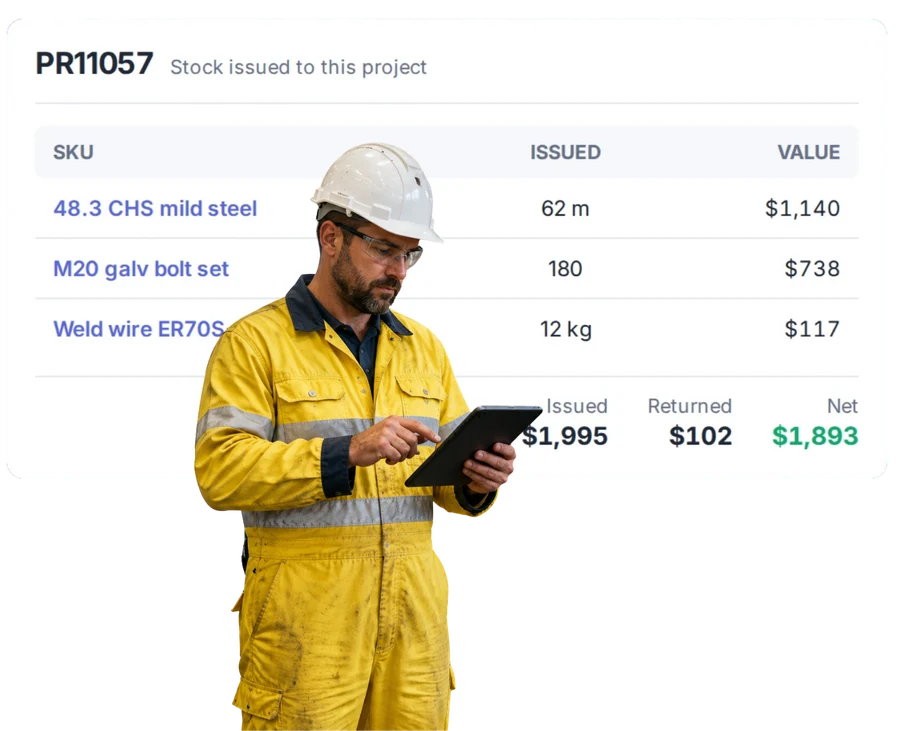
Overview
If you bought it for the job, keep it with the job.
Project purchasing is buying for a specific job rather than for the shelf. You raise the order against the project, and the cost attaches to that project rather than to a general pile reconciled later.
Orders move through the same three states as any other: Draft while you’re still building it, Approved once you’ve formally sent it to the supplier, and Received when the goods or services turn up. Approved orders can’t be quietly edited — to change one you revert it to draft, which keeps what was approved and what was sent as the same thing.
Receiving and costing are independent, and on project work that matters. The steel arrives in week two; the invoice with freight on it arrives in week five at a slightly different price. Because WorkGuru is a FIFO perpetual inventory system you can re-cost the order after receipt, so the landed cost on the job ends up correct rather than frozen at whatever was on the order.
The result is a job cost that includes what you actually spent, while the job is still running. That’s the difference between finding out about an overspend in time to act on it and finding out at the end.
What’s inside
What you get
01
Project-linked purchase orders
Keep buying connected to the job.
02
Supplier costs on jobs
Use the real supplier spend in job costing.
03
Material and outside-service purchases
Keep more than just stock items against projects.
04
Job history
Look back and see what was bought for the work.
The reality
Why you need it
The bill arrives weeks after the material was used.
By which time the job may be finished and invoiced. If the cost only exists when the bill lands, you found out what the job made after you’d already told the customer what it cost.
One supplier invoice covers several jobs.
And somebody in the office splits it, weeks later, from a delivery docket and their best guess. Orders raised against projects at the time mean the allocation is made by the person who actually knew.
The purchase was not in the original quote.
Which is precisely the purchase most worth capturing, because it’s either a variation you should be charging for or an overrun you need to know about. Unplanned buys are the ones most likely to be missed from a job cost.
Someone bought it in a hurry.
Urgent purchases skip process by definition. The question is whether the cost still lands on the job afterwards. If the only record is a receipt in someone’s ute, it doesn’t.
You only find the real material cost after the job is finished.
At which point it’s information, not a decision. The whole argument for putting purchases on the job as they happen is that it converts one into the other.
How it works
How it works
01
Start from the job
02
Raise the purchase against it
03
Keep the supplier and order with the purchase
04
Use the real cost
Capabilities
What it does
Capability
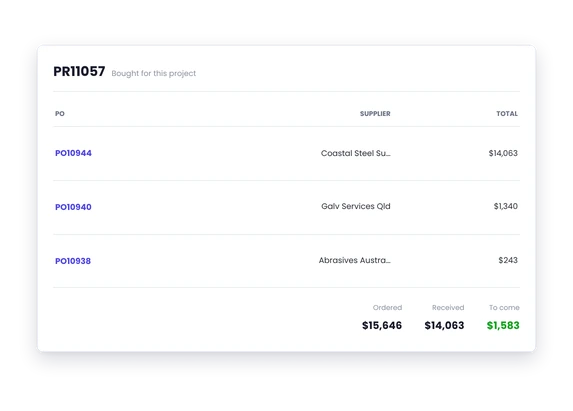
Project-linked purchase orders
The order is raised against the job, so the cost lands on that job rather than in a general pile reconciled at month end. Orders move Draft, Approved, Received — and approved orders can’t be quietly edited, they have to be reverted to draft, so what was approved stays the same as what was sent.
Capability
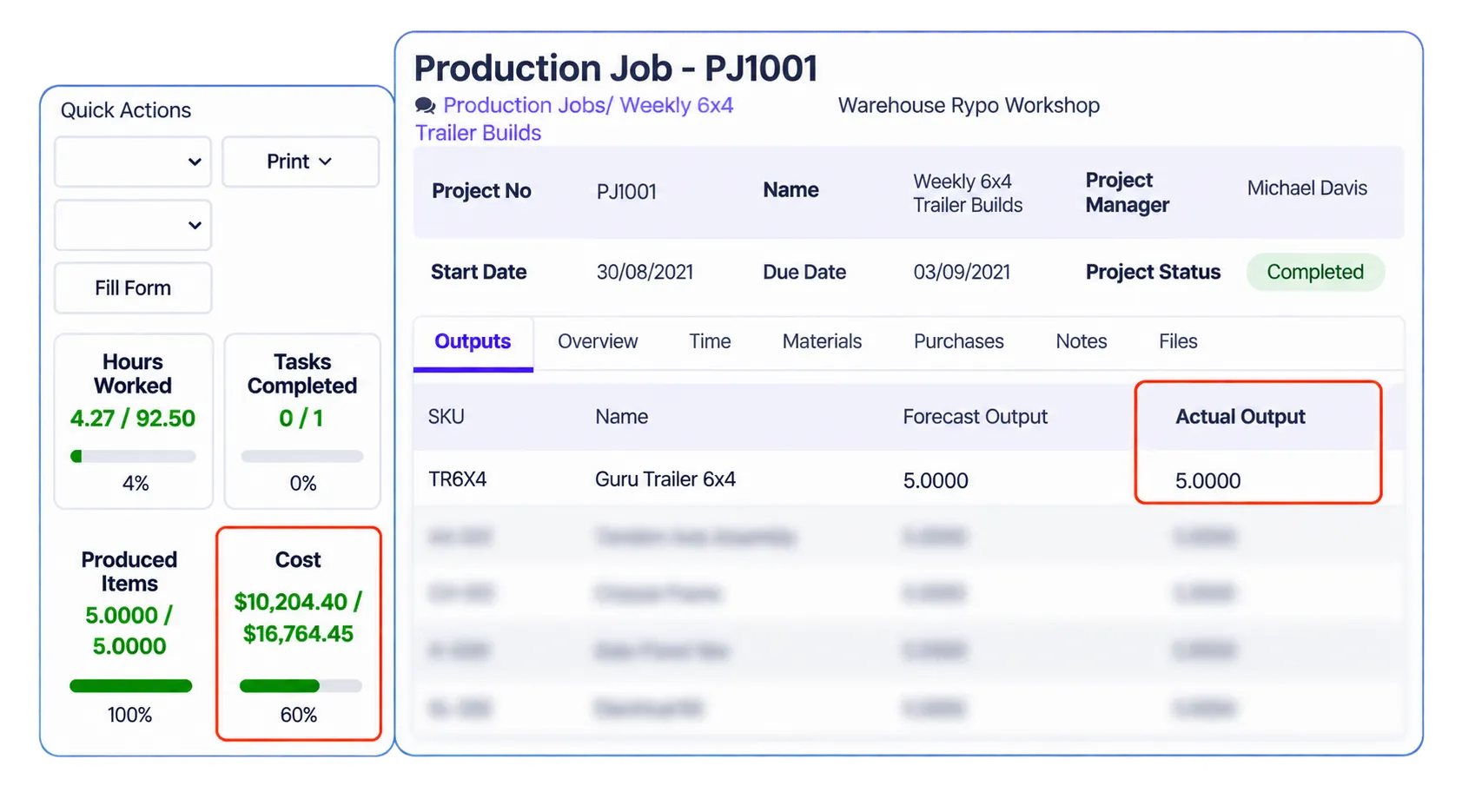
Supplier costs on jobs
Materials and subcontract sit alongside labour in the job cost while the job is still running. On most workshop jobs that’s the larger half of the spend, so a job cost without it isn’t really a job cost.
Capability
Material and outside-service purchases
Both go through the same route. Subcontract work set up as a non-stock product is purchased against the project like any other cost, which matters on fitout and installation work where subcontract often exceeds your own labour.
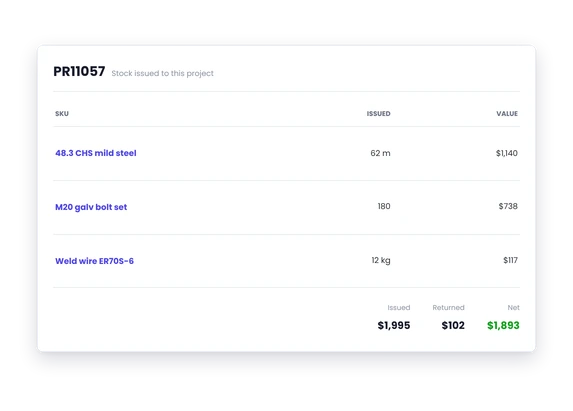
Job history
What was bought for this job, from whom, at what price. When the supplier invoice arrives weeks later at a different number, you have the order to check it against — and because receiving and costing are independent, you can re-cost after receipt so freight and price changes land in the job’s real cost rather than being lost.
Day to day
What it looks like on a normal day
A repair needs an unexpected hydraulic pump.
Buy it against the repair so the extra cost is visible.
A steel job needs another coating run.
Keep the outside processing cost with the job.
A build uses several bought-in components.
Keep every purchase against the build instead of working backwards at the end.
What you get out of it
What changes
Know what the job really bought
Keep supplier spend out of the mystery bucket.
Catch cost blowouts earlier
See extra purchases while the job is still underway.
Make job costing more believable
Real purchases beat estimates once the job starts.
Make the next quote better
Use what the last job actually needed.
-
Discovered their contract work wasn’t profitable.
We didn’t wanna pay 100 grand upfront for a program – but then we found WorkGuru.
Nick Mazzella, Administrator, Frontline Trays & Trailers
Fit
Will it work the way we do things?
“We do not know every purchase upfront.”
Almost nobody does. Purchase orders aren’t a plan you commit to at the start — they’re raised as the need appears. The point isn’t predicting the spend, it’s making sure that whenever a purchase happens it lands on the job rather than in a general expense account.
“Some supplier bills cover several jobs.”
That’s common, and it’s the case that makes coding bills in accounting so unreliable — one invoice, four jobs, and someone in the office guessing the split weeks later. Raising the orders against the projects at the time means the allocation is made by the person who knew the answer.
“We already code bills in accounting.”
Coding tells the accounts which job it was, eventually. It doesn’t put the cost on the job while the job is running, and it can’t be re-costed when freight or a price change lands later. Project purchasing gives you the cost at the point you could still act on it.
“We use stock as well as direct purchases.”
Most workshops do, and both work on the same job. Stock consumed is costed from inventory using FIFO; direct purchases are costed from the order. The job cost adds up either way, so you don’t have to standardise on one approach.
By trade
Where this gets used
Works with
Connected features
Project Management
Keep purchases with the rest of the job.
Purchase Orders
Put the order against the project.
Job Costing
Use the spend in the actual job result.
Quoting
Compare what you allowed with what you actually bought.
Reporting
Look back at the real cost mix.
FAQs
Purchasing Against Projects questions
Can purchases be linked to projects?
Yes, and it’s the standard way to work. Raising the purchase order against the project puts the material and subcontract cost onto that job, so it sits alongside labour in the job cost rather than in a general expense pile..
Can unexpected purchases still go onto the job?
Yes. Orders are raised as the need arises — there’s no requirement to have planned the purchase at the start. Unplanned buys are precisely the ones most likely to be missed from a job cost, so putting them through the same route is what keeps the number honest.
Does project purchasing feed job costing?
Yes, and on most workshop jobs it’s the larger half of the cost. Because receiving and costing are separate steps, you can also re-cost after receipt when the supplier invoice or freight changes the picture, so the landed cost on the job stays right.
Can we use both stock and direct purchases on a job?
Yes. A job can consume stock from inventory and take direct purchases raised against it, and both are costed onto the project. Stock is costed FIFO from what that stock actually cost; direct purchases from the order.
See what the job actually bought.
We will show you how WorkGuru keeps supplier spend tied back to the project.