
Home / Features / Project Management / Task Management
Projects & Jobs
Make it clear what needs doing.
Break bigger jobs into tasks so the team knows what’s next and you know what’s been done.

Overview
Big jobs are really a bunch of smaller jobs.
There’s the job you’ve sold. Then there’s everything that actually has to happen to get it done.
Design it. Order material. Cut it. Fabricate it. Paint it. Install it.
Tasks let you break the job down into the work your team actually needs to do.
Keep it simple when the job is simple. Add more detail when it isn’t.
What’s inside
What you get
01
Tasks against projects
Keep the work with the job it belongs to.
02
People against tasks
Make it clear who’s involved.
03
Task statuses
See what’s waiting, underway and finished.
04
Task information
Keep the details needed to get that piece of work done.
05
Flexible task setup
Add and change tasks as the job changes.
06
Project templates
Start repeat jobs with the usual tasks already there.
The reality
Someone has to keep track of all the moving parts.
Everyone knows what needs doing — until they don’t.
Most of it lives in people’s heads. That works until someone is away, gets pulled onto something else or simply forgets.
The job is “in progress”, but that doesn’t tell you much.
Some of it might be done. Some hasn’t started. One bit is waiting on material.
Something small gets missed.
It’s usually the little thing between two bigger bits of work that catches you out.
The next person isn’t ready.
Their part of the job depends on something else being finished first.
You’re managing the job from memory.
Fine when you’ve got three jobs. Harder when you’ve got thirty.
How it works
Break the job into the work.
01
Set up the tasks
02
Put some detail around them
03
Get people onto the work
04
Update things as you go
05
See what’s done
Capabilities
The work, broken down.
Capability
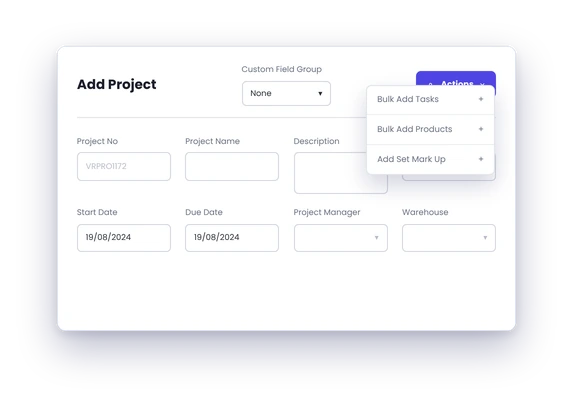
Tasks against projects
Keep the work with the job it belongs to.
Capability
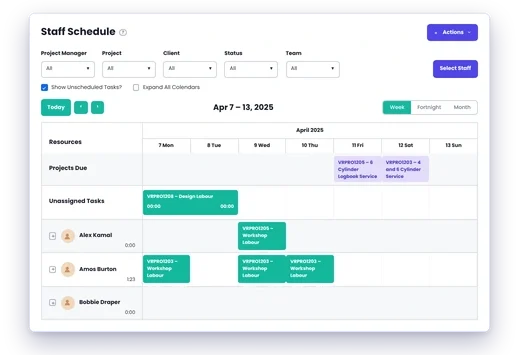
People against tasks
Make it clear who’s involved.
Capability
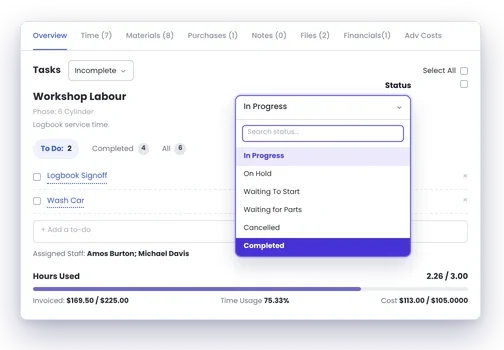
Task statuses
See what’s waiting, underway and finished.
Task information
Keep the details needed to get that piece of work done.
Flexible task setup
Add and change tasks as the job changes.
Project templates
Start repeat jobs with the usual tasks already there.
Day to day
What does that actually look like?
A fabrication job hits the floor.
Instead of one big “Fabricate Job 1842”, break it into the work the team actually needs to get through. The team can see what’s theirs. The project manager can see what’s been done.
Something changes halfway through.
The customer adds another item. Add the work that comes with it instead of trying to squeeze it into the original job setup.
Someone finishes their part.
The next person doesn’t need to walk around asking whether they can start. They can see where things are at.
What you get out of it
What changes
Make the job easier to understand
Break a big piece of work into manageable parts.
Make it clear what needs doing
Give people something better than “work on Job 1842”.
See what’s left
Know which parts are done and which still need attention.
Stop relying on memory
Put the work onto the job instead of keeping the plan in someone’s head.
Change the plan when the job changes
Add or adjust tasks when you need to.
-
Discovered their contract work wasn’t profitable.
We didn’t wanna pay 100 grand upfront for a program – but then we found WorkGuru.
Nick Mazzella, Administrator, Frontline Trays & Trailers
Fit
Will it work the way we do things?
“Do we really need tasks for every job?”
No.
“Some of our jobs are tiny.”
Keep them simple. There’s no prize for adding twenty tasks to a two-hour job.
“Every job has different tasks.”
That’s fine. Add the work that particular job needs.
“We don’t want to make jobs overly complicated.”
Neither do we. Use enough detail to make the job clearer. Stop there.
“Our team already knows what to do.”
Good. Tasks aren’t there to tell skilled people how to do their jobs. They’re there to make it clear what needs doing and keep track of where the job’s at.
By trade
Where this gets used
Works with
Connected features
Project Management
Keep the tasks with the rest of the job.
Project Templates
Start common jobs with the usual tasks already there.
Scheduling
Work out when the tasks need doing.
Work Areas
Organise work around where it needs to happen.
Timesheets
Put hours against the work people actually did.
Project Chat
Talk about the job without losing the conversation.
FAQs
Task Management questions
Can tasks be added after a project has started?
Yes. Add or change the work as the job changes.
Can different jobs have different tasks?
Yes. Set the job up around the work it actually needs.
Can templates include tasks?
Yes. Repeat jobs can start with the usual work already set up.
Can we track time against tasks?
Yes. That gives you more detail about where the hours went within the job.
See how your jobs would break down in WorkGuru.
Bring us a real job and we’ll show you how you’d set it up.