
Job Costing & Finance
Make paying the invoice easier.
Use GuruPay where it fits your billing workflow so the customer can move from invoice to payment with less back-and-forth.
Overview
The payment step should not need another pile of admin.
You have already done the hard bit: quote the work, deliver the job and get the invoice out.
GuruPay is intended to make the next customer step simpler by keeping a payment option close to the WorkGuru invoice workflow.
Because payment availability, pricing, settlement and supported transaction types can change by market, every specific GuruPay claim on this page needs product review before publishing.
What’s inside
What you get
01
WorkGuru payment option
Offer GuruPay inside the wider invoice workflow where available.
02
Invoice connection
Keep payment close to the bill the customer is paying.
03
Customer experience
Reduce unnecessary steps between invoice and payment.
04
Commercial visibility
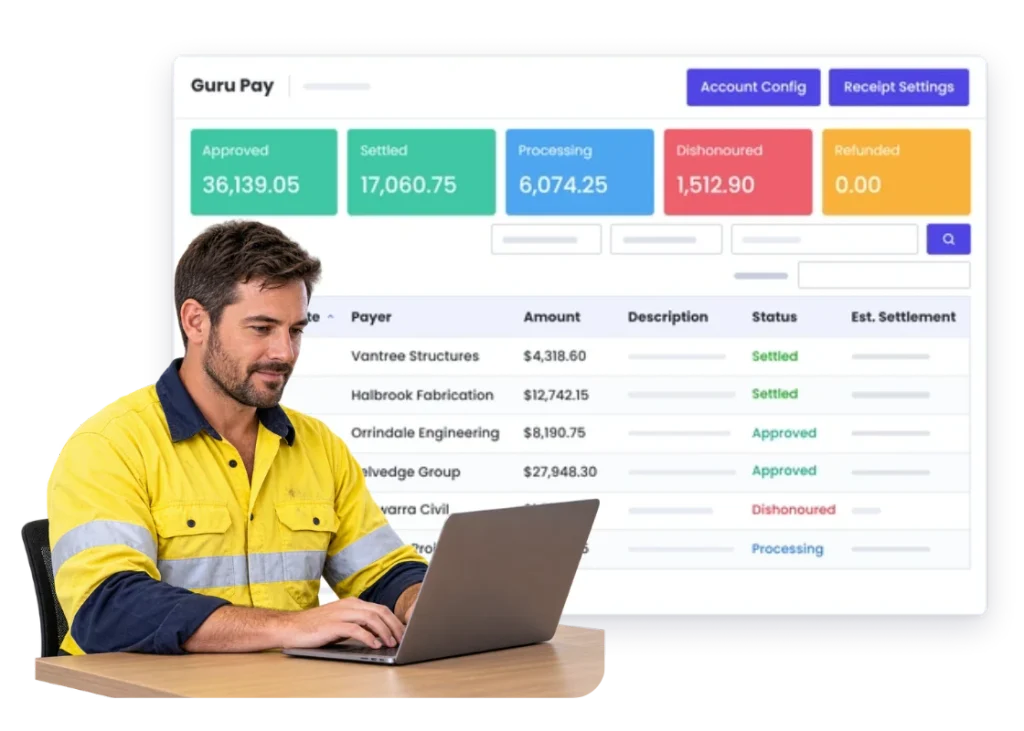
Manage GuruPay payments directly in WorkGuru and see whether transactions are Approved, Settled, Processing, Disputed or Refunded.
05
Finance handoff
Set the bank account where cleared GuruPay payments are settled as part of your GuruPay setup.
06
Market availability
Publish only currently confirmed countries, fees and settlement details.
The reality
Why you need it
The customer asks how they can pay.
Another email or phone call gets added after the invoice has already been sent.
The invoice and payment path are separate.
The customer has to work out what to do next instead of being given a clear option.
Small payments create too much admin.
The process around collecting the money can take longer than the transaction deserves.
The office is chasing open invoices manually.
Anything that removes an unnecessary step helps the team focus on the accounts that actually need attention.
Different teams explain payment differently.
A consistent enabled option makes the handoff clearer.
Nobody wants another disconnected payment tool.
The value comes from keeping the payment step close to the WorkGuru commercial workflow.
How it works
How it works
01
Raise the invoice
02
Make GuruPay available
03
Send the customer the invoice
04
Customer completes payment
05
Keep the payment trail visible
06
Handle exceptions
07
Keep finance authoritative
08
Review the workflow
Capabilities
What it does
Capability
WorkGuru payment option
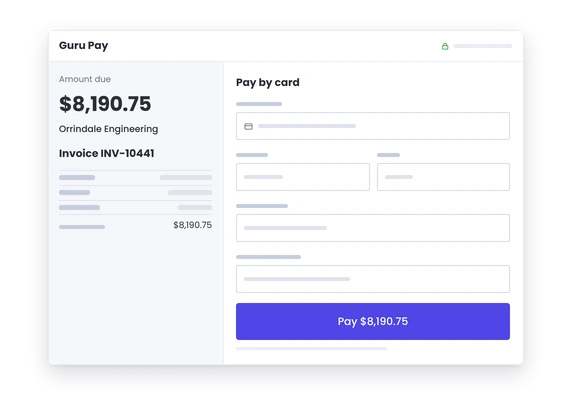
Offer GuruPay inside the wider invoice workflow where available.
Capability
Invoice connection
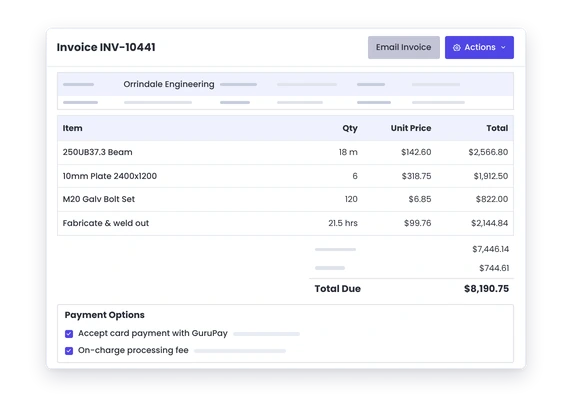
Keep payment close to the bill the customer is paying.
Capability
Customer experience
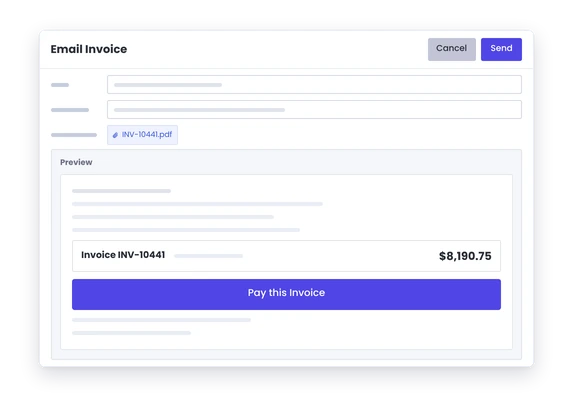
Reduce unnecessary steps between invoice and payment.
Commercial visibility
Make the invoice-to-payment trail easier to follow. Product review required.
Finance handoff
Keep accounting and reconciliation processes with the system responsible for them.
Market availability
Publish only currently confirmed countries, fees and settlement details.
Day to day
What does that actually look like?
A customer wants to pay immediately.
Give them an enabled option from the invoice workflow instead of another manual set of instructions.
A small invoice should be simple to settle.
Keep the payment experience proportionate to the transaction.
The office keeps sending bank details manually.
Use a consistent payment path where GuruPay is the right fit.
The business also has account customers.
Keep their normal terms. GuruPay does not need to replace every payment method.
You expand into another market.
Check GuruPay availability and commercial terms before changing the website promise.
What you get out of it
What changes
Give customers a clearer next step
Make the route from invoice to payment easier where GuruPay applies.
Cut repeat payment admin
Reduce unnecessary instructions and back-and-forth.
Keep the payment close to the invoice
Do not create another disconnected transaction trail.
Use it only where it fits
Keep EFT, account terms or other payment methods where they make sense.
Protect the finance boundary
Keep formal accounting and reconciliation in the finance system.
-
Discovered their contract work wasn’t profitable.
We didn’t wanna pay 100 grand upfront for a program – but then we found WorkGuru.
Nick Mazzella, Administrator, Frontline Trays & Trailers
Fit
Will it work the way we do things?
“We already use EFT.”
Keep it if it works. GuruPay should be another useful option, not a reason to force every customer into one payment method.
“Our customers pay on account.”
That is fine. Use the commercial terms that suit the relationship.
“We worry about payment fees.”
Reasonable. Publish current fee information only after it has been confirmed for the market.
“We already use another payment provider.”
Keep the setup that works unless GuruPay gives you a simpler overall workflow.
“We operate in several countries.”
Current WorkGuru GuruPay setup and verification documentation is Australian-specific.
By trade
Where this gets used
Works with
Connected features
Invoicing
Start from the customer bill.
Payments
Keep the wider payment workflow visible.
Client Management
Keep the commercial relationship around the customer.
Counter Sales
Use payment options around direct sales where supported.
Automations
Handle reminders and follow-up where configured.
Accounting Integrations
Keep the finance system connected where supported.
FAQs
GuruPay questions
What is GuruPay in WorkGuru?
GuruPay is WorkGuru’s integrated payment feature, provided in collaboration with Pinch Payments. It lets customers pay by debit or credit card through a payment link included in your WorkGuru invoice emails.
Do customers have to use GuruPay?
No. GuruPay gives customers another way to pay. You can continue using EFT, account terms and your other existing payment methods alongside it.
Does GuruPay replace our accounting system?
No. GuruPay sits around the payment workflow while accounting or ERP remains responsible for the formal financial record.
What fees does GuruPay charge?
GuruPay has payment processing fees, and you can choose to pass those fees on to the customer. If you do, WorkGuru automatically adds the surcharge to the invoice. Current fee rates are not published in the WorkGuru support documentation, so contact WorkGuru for the current GuruPay rates.
See whether GuruPay fits your payment workflow.
Show us how customers pay you today and we will show where GuruPay can simplify the invoice-to-payment step without forcing a new process.