
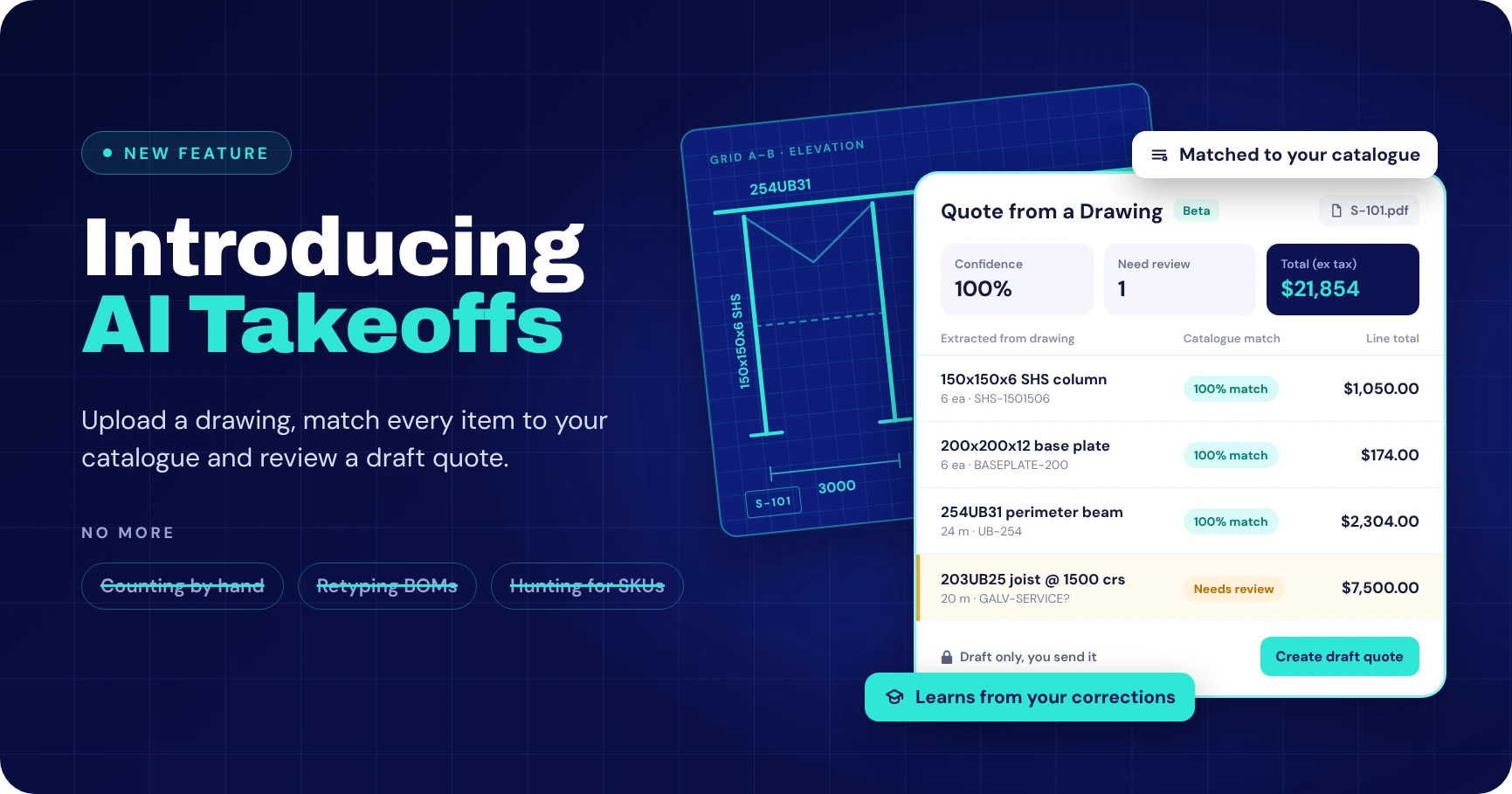
From drawings to quotes, faster
AI Takeoffs reads your drawings and documents, matches what it finds to your product catalogue, and gives your estimator a draft quote to check.
Before you can price a job, someone has to work out what’s in it.
That often means working through drawings, counting materials, checking specifications and matching everything to your product list. Then comes the work of turning that information into a quote.
For fabrication, manufacturing and engineering businesses, this preparation can take up a substantial part of the quoting process.
AI Takeoffs in WorkGuru helps you get from drawings and documents to a quote faster, using AI alongside the product catalogue you already work with.
Upload your drawing, tell the AI what to look for and review the results before moving ahead with your quote.
What is an AI takeoff?
A takeoff is the process of identifying the materials, components and quantities needed for a job from drawings or other project information.
It provides the groundwork for estimating. Before you can decide what to charge, you need to understand what the job requires.
An AI takeoff uses artificial intelligence to help extract that information, reducing the amount of manual preparation needed to get started.
In WorkGuru, AI Takeoffs connects that extraction process with your existing product list, helping turn information from drawings, spreadsheets and documents into quote line items.
How AI Takeoffs works in WorkGuru
WorkGuru AI Takeoffs uses an AI model, currently Google Gemini, to analyse an uploaded document and match the extracted information against your product catalogue.
The aim is to generate a quote based on the bill of materials, or BOM: the list of materials and components required for the job.
Here’s how the process comes together.
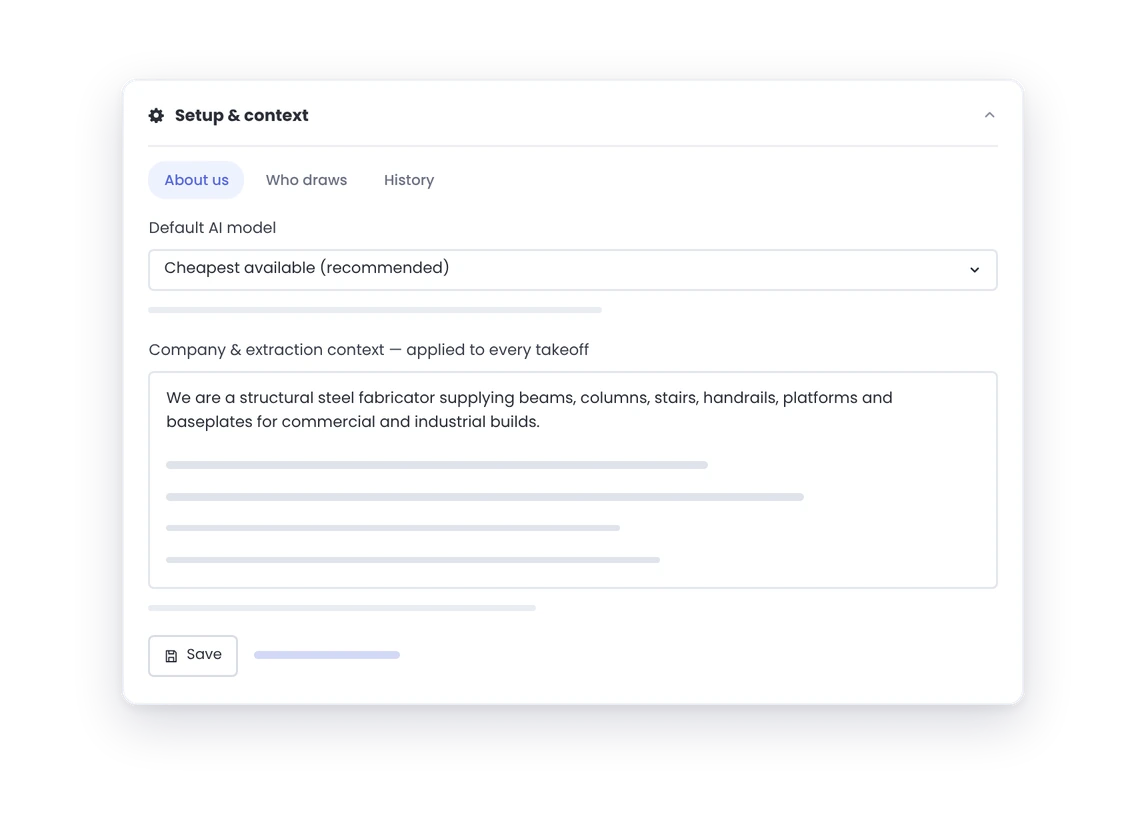
1Give the AI context about your business
A drawing can contain a lot of information. Your business may only need to quote part of it.
You configure AI Takeoffs with a prompt explaining what your business does and what the AI should look for.
For example, a fabrication business might explain the types of components it supplies, the material descriptions it uses and the information relevant to its quoting process.
That context helps guide the extraction towards the work you actually need to price.
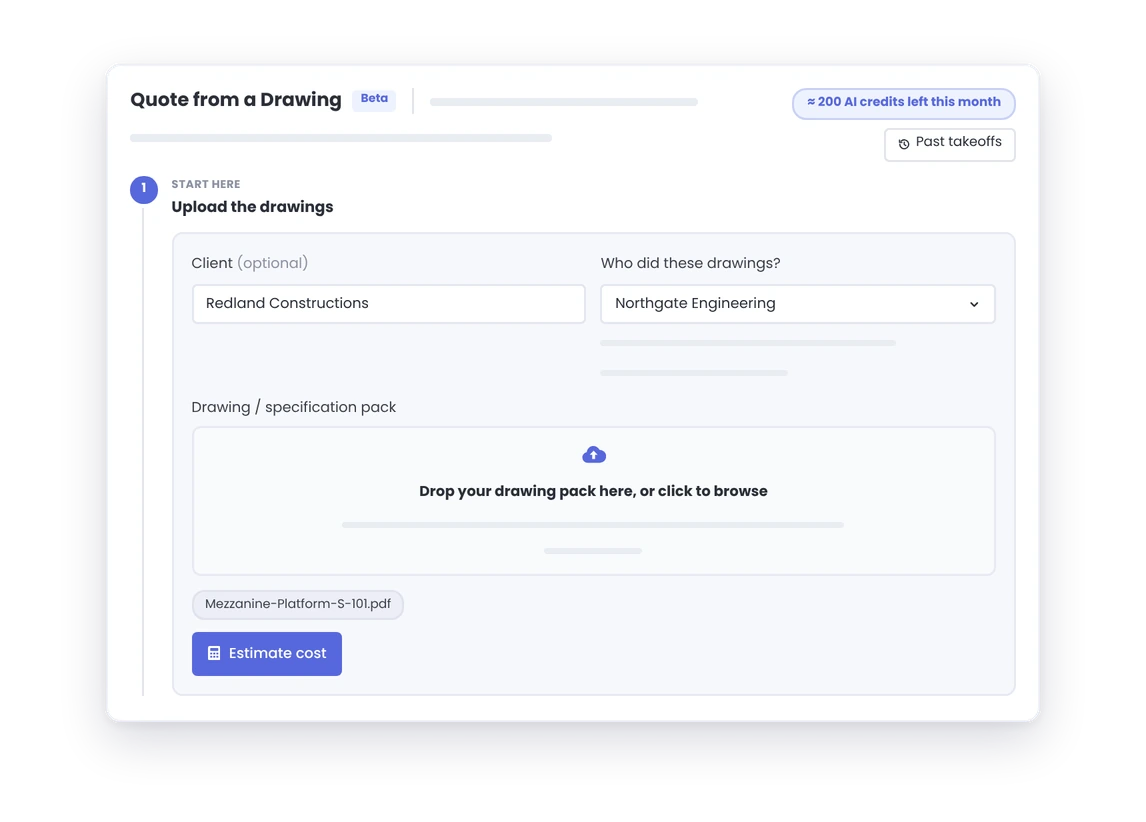
2Upload your drawing or document
Upload the source information you want the AI to analyse.
WorkGuru AI Takeoffs is designed to help you quote from drawings, spreadsheets and documents, bringing the extraction process closer to where you build your quotes.
3Match extracted items to your product list
Identifying an item in a drawing is only part of the work.
Your team also needs to connect it with the product you supply and the way it is recorded in your system.
WorkGuru uses AI to match extracted information against your product list. This helps bridge the gap between the descriptions on a drawing and the catalogue your business uses every day.
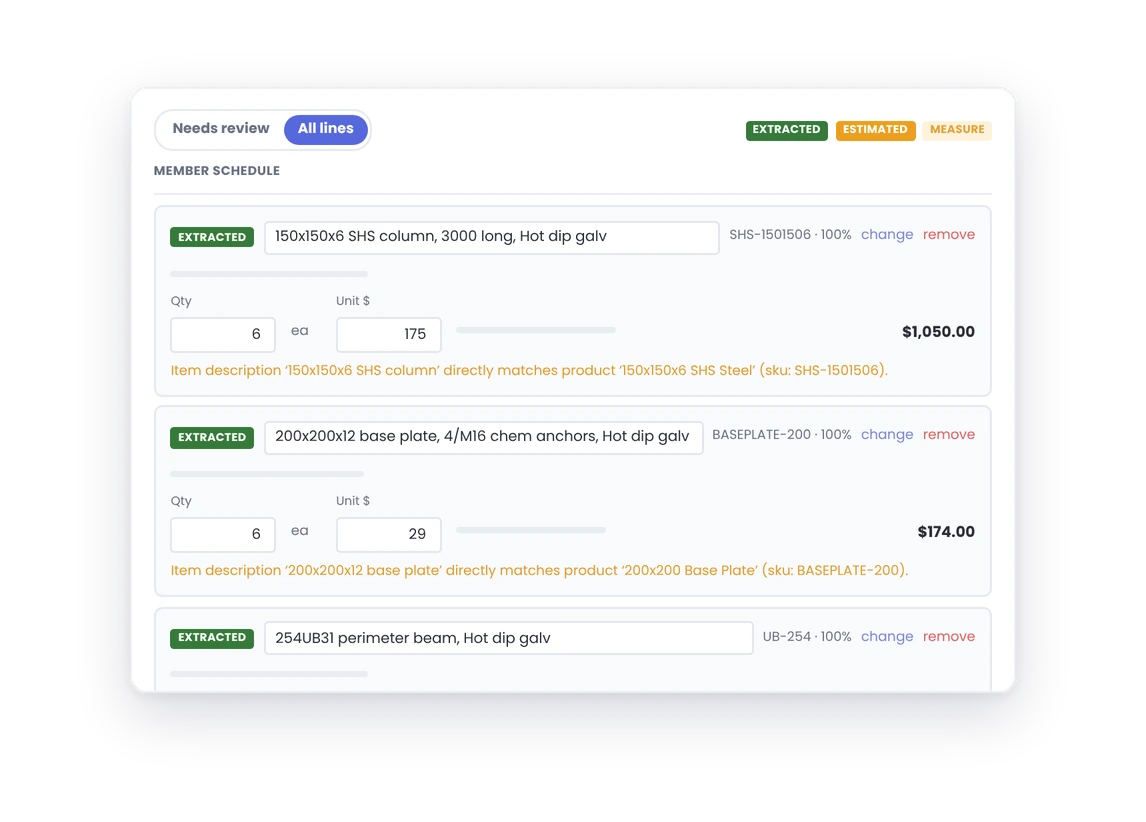
4Review and correct the results
You stay in control of what goes into the quote.
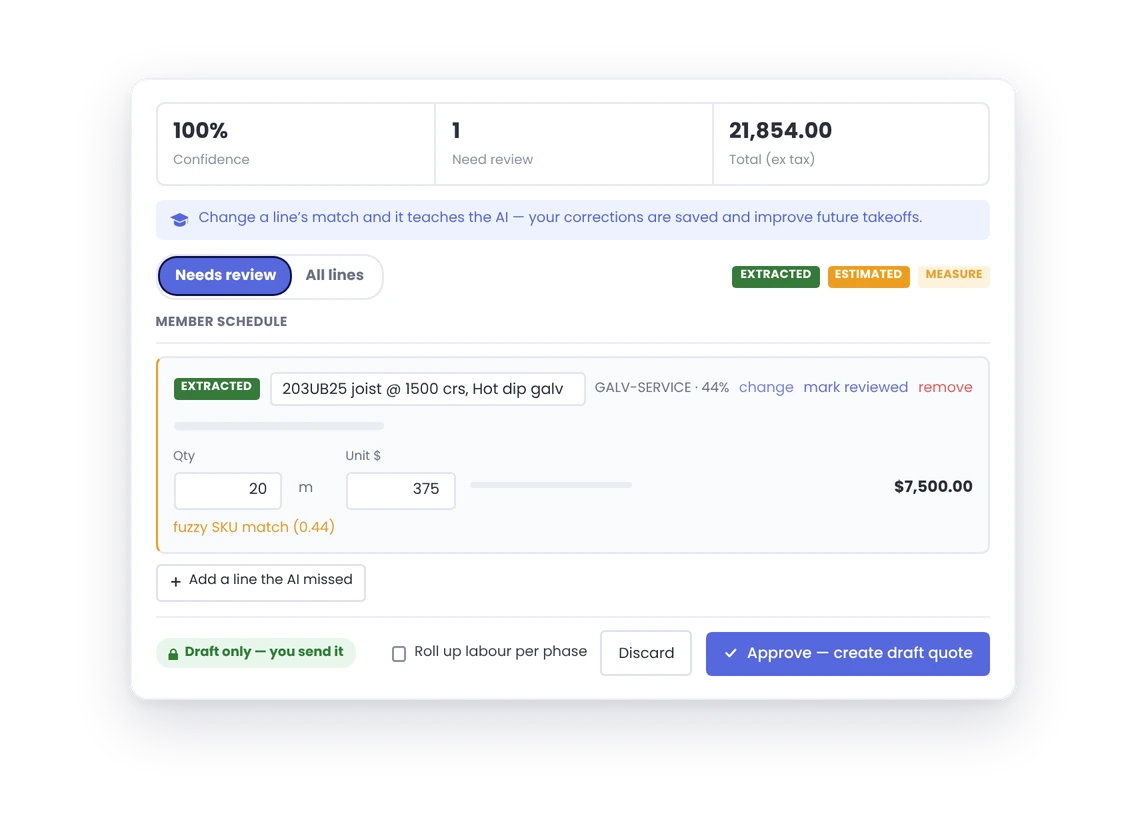
Review quantities, prices and product matches. You can correct lines, remove incorrect items and add anything the AI missed. Once reviewed, the results can become a draft quote for further checking before issue.
Your corrections help improve future takeoffs
Every business has its own products, terminology and ways of quoting.
A description on a drawing may not exactly match the name in your product catalogue. An abbreviation may be familiar to your estimator but unclear to the AI.
WorkGuru AI Takeoffs uses your corrections to help improve future results.
When an item is matched incorrectly, or the AI is unsure which product to use, correcting it provides feedback for the next takeoff.
That makes reviewing the results useful beyond the quote you are working on. It also helps build context for future work.
Learning is specific to the drawing provider
Drawings from different providers can use different layouts, descriptions and conventions.
WorkGuru’s learning is specific to the drawing provider, helping it apply the relevant feedback when you receive more drawings from that source.
For businesses that regularly quote work from the same customers, engineers or designers, this gives the AI more relevant context to work with over time.
AI Takeoffs · Beta
Ready to Spend Less Time on Takeoffs?
AI Takeoffs is available now through the beta program. Get in touch and our support team will turn it on for your account.
Spend less time preparing and more time estimating
Your estimator’s experience matters most when making decisions about the job.
- What is difficult to manufacture?
- What needs clarification?
- What labour allowance makes sense?
- Where could the margin disappear?
Repetitive extraction and data entry take time away from those decisions.
AI Takeoffs is designed to reduce that preparation work, giving your team a starting point they can review and develop.
The potential benefits are practical:
- Less manual entry: Reduce the work involved in transferring information from source documents into a quote.
- A connection to your catalogue: Match extracted items with the products your business already uses.
- A more repeatable process: Give the AI context about your business and improve its guidance through corrections.
- More time for judgement: Let your team focus on scope, pricing and the details that affect profitability.
The result still depends on the source document, the instructions you provide and the quality of the review.
What could this look like in a fabrication business?
Imagine a customer sends through a drawing package for a fabricated assembly.
Your estimator needs to identify the relevant components, work out the quantities and match those items with your product catalogue before preparing the price.
With AI Takeoffs, they can upload the drawing and use instructions tailored to the business to guide the extraction.
They then check the proposed items against the drawing, correct any mismatches and fill in anything missing.
The value is in getting to a useful starting point sooner, with the estimator’s experience guiding the quote from there.
Does AI Takeoffs replace the estimator?
Your estimator remains responsible for the quote.
AI can help with extracting and organising information. Your team still needs to assess the scope, check the quantities and product selections, and decide whether the proposed price makes commercial sense.
That review is especially important where a drawing is ambiguous or a job requires knowledge that is not written on the page.
AI Takeoffs gives your team assistance with the preparation while keeping their judgement central to the process.
Watch AI Takeoffs in action
See how WorkGuru brings AI, source documents and your product catalogue together in the demonstration below.
Can’t see the video? Watch the WorkGuru AI Takeoffs demonstration on YouTube.
How to get started with AI Takeoffs
1
Join the beta
AI Takeoffs is available now through the beta program. Contact support@workguru.io and we’ll turn it on for your account.
2
Tell the AI about your business
Write a prompt explaining what your business does and what the AI should look for in your drawings.
3
Upload a drawing or document
Add a drawing, spreadsheet or document, and WorkGuru matches what it extracts against your product catalogue.
4
Review and create your draft quote
Check quantities, prices and matches, correct anything that’s off, and turn the results into a draft quote.
Exploring WorkGuru for your business? Learn more about AI Takeoffs and speak with the team about how it could fit your quoting process.
FAQs
Frequently Asked Questions
What is an AI takeoff?
A takeoff is the process of identifying the materials, components and quantities needed for a job from drawings or other project information. An AI takeoff uses artificial intelligence to help extract that information, reducing the manual preparation needed before you can estimate.
How does AI Takeoffs work in WorkGuru?
You give the AI context about your business, upload a drawing, spreadsheet or document, and WorkGuru uses AI to extract the items and match them against your product catalogue. You then review and correct the results before they become a draft quote.
Which AI model does WorkGuru AI Takeoffs use?
WorkGuru AI Takeoffs currently uses Google Gemini to analyse uploaded documents and match the extracted information against your product catalogue.
Do my corrections improve future takeoffs?
Yes. When you correct an item that was matched incorrectly, or one the AI was unsure about, that correction provides feedback for the next takeoff. The learning is specific to the drawing provider, so it is applied when you receive more drawings from the same source.
Does AI Takeoffs replace the estimator?
No. Your estimator remains responsible for the quote. AI helps extract and organise information, while your team assesses the scope, checks quantities and product selections, and decides whether the price makes commercial sense.
How do I get access to AI Takeoffs?
AI Takeoffs is currently available through the beta program. Existing WorkGuru customers can contact support@workguru.io to request access.