
ERP vs Job Management Software: What’s the Difference?
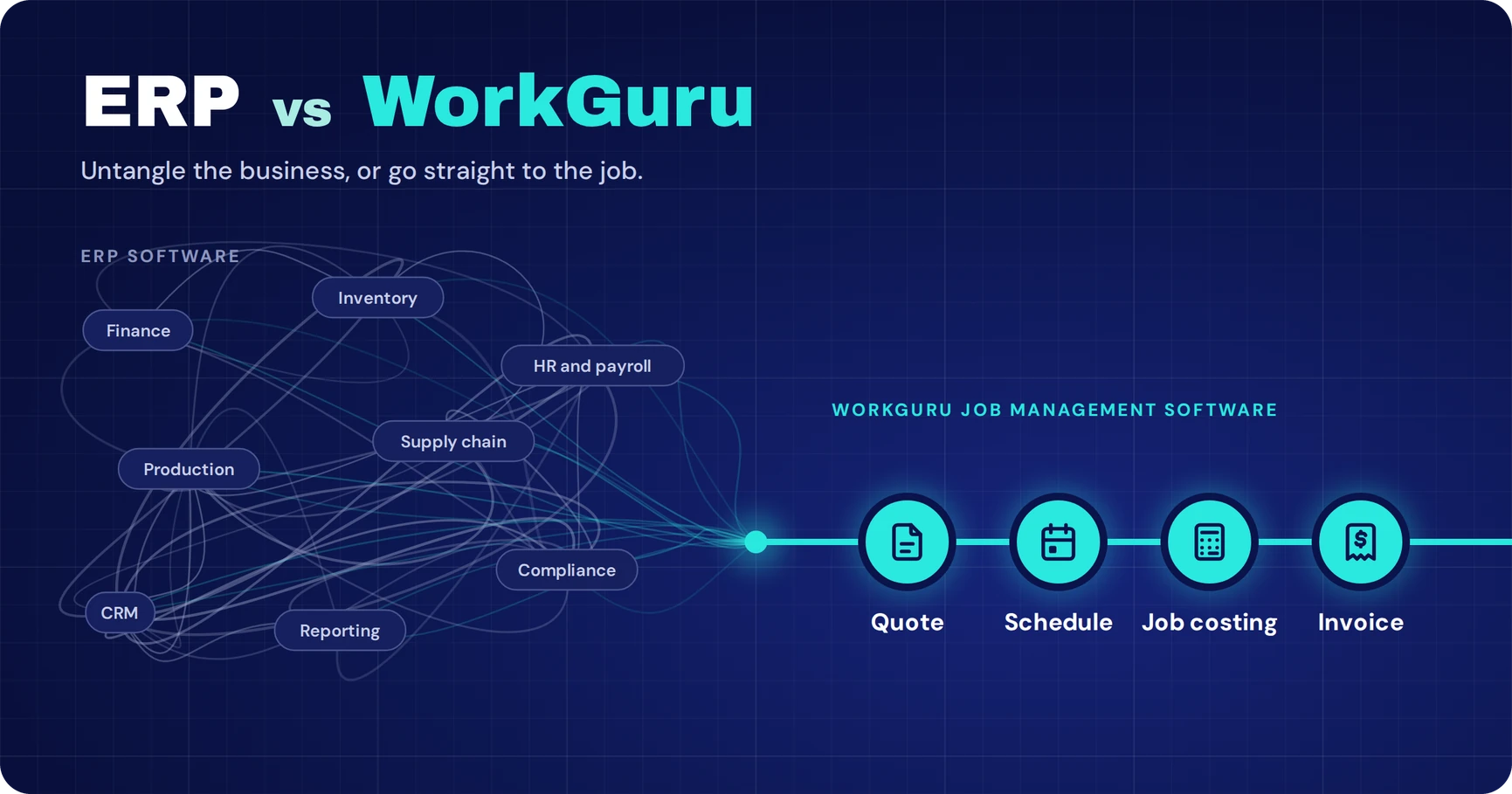
ERP (Enterprise Resource Planning) software is designed to manage multiple business functions, including finance, inventory, production and supply chains. Job management software focuses on managing individual jobs, including quoting, scheduling, purchasing, labour tracking and job costing.
For fabrication, engineering and project-based manufacturing businesses, job management software may be a more suitable option when the main priority is improving operational visibility rather than managing enterprise-wide processes.
What Is ERP Software?
ERP stands for Enterprise Resource Planning.
It’s software designed to bring different parts of a business together under one system.
Depending on the platform, an ERP can manage:
-
Finance and accounting
-
Inventory and purchasing
-
Production and manufacturing
-
Human resources and payroll
-
Supply chain management
-
Sales and customer relationships
-
Reporting and business intelligence
-
Quality and compliance
The idea is straightforward: instead of running separate systems across different departments, an ERP brings business information together.
For larger manufacturers with complex supply chains, multiple locations, extensive inventory requirements or sophisticated financial processes, that can be valuable.
But not every growing fabrication or engineering business needs that level of functionality.
And that’s where the distinction becomes important.
The Price of an ERP Isn’t Just the Software
When businesses compare software, one of the first things they look at is the subscription or licensing cost.
But with ERP systems, the licence can be just one part of the overall investment.
Depending on the system, its complexity and how it’s implemented, there may be several additional costs to consider.
1. Implementation
ERP implementation can involve mapping your existing processes, migrating historical data, configuring workflows and testing how different departments will use the system.
The more complicated your operations, the more work may be involved.
2. Consultants
Some ERP implementations require external consultants or specialist implementation partners.
These specialists can help configure the software, manage the rollout and adapt the system to business requirements.
That expertise can be valuable, but it also needs to be included in your budget.
Some ERP implementations require external consultants or specialist implementation partners.
These specialists can help configure the software, manage the rollout and adapt the system to business requirements.
That expertise can be valuable, but it also needs to be included in your budget.
3. Customisation
Your business probably doesn’t operate exactly like every other manufacturer.
You might quote fabrication jobs differently, manage workshop production through specific stages or purchase materials against individual projects.
If an ERP doesn’t support those workflows out of the box, additional configuration or custom development may be required.
4. Training & Change Management
Introducing a new system affects the people using it.
Your estimators, project managers, workshop supervisors and accounts team may all need training.
And if the system significantly changes how people work, adoption can take time.
5. Ongoing Support
The investment doesn’t necessarily end when the software goes live.
Support agreements, system maintenance, additional modules and future changes may all contribute to the total cost of ownership.
The investment doesn’t necessarily end when the software goes live.
Support agreements, system maintenance, additional modules and future changes may all contribute to the total cost of ownership.
The takeaway?
When comparing ERP systems, don’t just ask what the software costs per month.
Ask what it will cost to implement, operate and maintain the system over the next three to five years.
And more importantly, ask whether your business needs all the functionality you’re paying for.
What Do You Actually Need to Control?
Before comparing software platforms, it’s worth identifying the problems you’re trying to solve.
For many fabrication, engineering and manufacturing businesses, those problems aren’t necessarily related to enterprise-wide resource planning.
They’re happening on the workshop floor, inside individual projects and throughout everyday operations.
1. Where Is Every Job At?
You’ve got multiple projects running at once.
Some are waiting for materials. Others are in fabrication. A few are ready for installation.
But getting an accurate update means calling the workshop supervisor, checking a spreadsheet or walking onto the floor.
What you need is visibility into the status of your jobs, the work remaining and the next steps.
2. What Are Your Labour and Material Costs?
You quoted a job based on an estimated number of labour hours and a material allowance.
But as the job progresses, labour takes longer than expected. Additional steel gets ordered. A supplier increases their price.
If those costs aren’t being captured against the job, you may not know how much of your margin has disappeared until the project is finished.
What you need is the ability to compare estimated costs against actual costs while work is still underway.
3. What’s Happening in the Workshop?
You’ve got people, machines, workshop bays and deadlines to coordinate.
Then a material delivery gets delayed, a job runs overtime or an urgent project needs to be brought forward.
Suddenly, the schedule needs to change.
What you need is a practical way to plan work, allocate resources and adjust the schedule when circumstances change.
4. Are Your Jobs Actually Profitable?
Winning more work doesn’t automatically mean making more money.
A fabrication business can have a full workshop and still struggle with profitability if labour, materials and purchasing costs aren’t being tracked properly.
What you need is a clear picture of job profitability, not just a report at the end of the month.
If these are the problems you’re trying to solve, job management software may be a more suitable place to start than a comprehensive ERP.
ERP vs Job Management Software: What’s the Difference?
ERP and job management software can overlap in functionality, but they’re generally designed around different priorities.
ERP systems typically focus on coordinating multiple business functions, including financial, operational and administrative processes.
Job management software focuses on the work being delivered: from the initial quote through to job completion and invoicing.
| ERP software | WorkGuru |
|---|---|
| Broad business-wide functionality | Focused on job and operational management |
| May include finance, HR, manufacturing and supply chain modules | Quoting, scheduling, purchasing, timesheets and job costing |
| Implementation depends on scope, integrations and configuration | Implementation focused on job-based workflows |
| Can support complex enterprise operations | Designed around project-based operational workflows |
| May provide integrated accounting or connect to external systems | Integrates with supported accounting platforms |
Neither approach is automatically better.
The right choice depends on your business model, operational requirements and the complexity of the systems you need to manage.
A large manufacturer managing multiple factories, complex production planning and extensive supply chains may benefit from a comprehensive ERP.
A fabrication workshop primarily trying to improve quoting, job costing, scheduling and purchasing may not need that level of system.
WorkGuru vs ERP: The Honest Trade-Offs
WorkGuru – Cons
No Built-In Accounting
WorkGuru doesn’t include a built-in general ledger or full accounting system. Instead, it focuses on job management and operational processes, integrating with accounting software to manage your financials.
ERP – Pros
Single Unified System of Record
An ERP can bring operations and accounting together in one system, including a built-in General Ledger, providing a centralised view of business activity and financial data.
ERP – Cons
Specialised Accounting Expertise
Finding accountants and bookkeepers experienced with a particular ERP can be more difficult and expensive than finding professionals familiar with widely used small-business accounting platforms such as Xero or MYOB.
When Does an ERP Actually Make Sense?
It’s important to recognise that ERP systems serve a purpose.
There are situations where an ERP may be a better choice than standalone job management software.
For example, your business might need:
- Complex multi-site manufacturing and distribution management.
- Advanced material requirements planning (MRP) across extensive production processes.
- Integrated enterprise-level finance, procurement and supply chain management.
- Sophisticated inventory and warehouse operations across multiple locations.
- Industry-specific regulatory, traceability or compliance capabilities.
- Consolidated reporting across multiple companies or business units.
If those requirements are central to how your business operates, an ERP deserves serious consideration.
But if your biggest problems are knowing where jobs are at, tracking labour and material costs, scheduling workshop work and understanding profitability, it’s worth evaluating job management software before committing to a larger system.
Do You Really Need an ERP? A Perspective From WorkGuru
For many growing fabrication and engineering businesses, the decision to investigate ERP software starts with an operational problem.
Jobs are becoming harder to track. Materials and labour costs are spread across different systems. Scheduling changes are difficult to manage, and understanding whether a project is profitable takes more work than it should.
But buying a system that manages every part of the business isn’t necessarily the answer.
The more important question is whether the business needs enterprise-wide functionality or better control over the jobs it’s already delivering.
For businesses whose main challenges involve quoting, scheduling, purchasing and job costing, dedicated job management software may be a more practical starting point.
An ERP can be valuable when a business needs complex financial, manufacturing and supply chain capabilities. But the decision should be based on the problems the business actually needs to solve, rather than assuming a larger system is automatically better.
How WorkGuru Connects Your Jobs From Quote to Invoice
WorkGuru is job management software designed to help project-based businesses manage their operations.
Rather than attempting to replace every system across your business, WorkGuru focuses on the operational work involved in delivering jobs.
Here’s how that looks in practice.
WorkGuru job management software
How WorkGuru Connects Your Jobs From Quote to Invoice
Focused on the operational work of delivering jobs, not replacing every system across your business.
-
01Quoting
Start with the costs
Build quotes from real labour and material costs.
-
02Job management
Turn the quote into a job
Accepted quotes become jobs without rebuilding.
-
03Scheduling
Plan the work
Plan staff, tasks and workshop resources.
-
04Purchasing
Connect materials to the job
Raise purchase orders against the job.
-
05Timesheets
Capture labour against the work
Your team logs time against jobs and tasks.
-
06Job costing
Compare quoted vs actual
Compare actual costs against your estimates.
-
07Invoicing
Complete the process
Invoice from connected job information.
- Works alongside supported accounting platforms. See integrations
FAQS
Frequently Asked Questions
Does a fabrication business need ERP software?
Not necessarily. Fabrication businesses that primarily need quoting, scheduling, purchasing and job costing may find job management software sufficient. More complex manufacturing operations may require ERP functionality.
What is the best alternative to ERP for a small manufacturing business?
Job management software is one alternative when the business primarily needs to coordinate jobs, staff, materials and costs. The right solution depends on its production processes, inventory requirements and accounting needs.
Can job management software work with existing accounting software?
Yes. Some job management platforms integrate with accounting systems. WorkGuru supports integrations with platforms including Xero, MYOB and QuickBooks, subject to the relevant integration’s capabilities.
When should a manufacturing business consider an ERP?
An ERP may be appropriate when a business needs complex multi-site operations, advanced material requirements planning, enterprise-wide financial processes or extensive supply chain management.
Before You Invest in an ERP, Look at What Your Business Actually Needs
If your fabrication or engineering business is growing, the answer isn’t always a bigger, more complicated system.
Sometimes, you simply need to bring your quoting, jobs, scheduling, purchasing, labour and job costing together.
An ERP might be the right choice if your business needs complex, enterprise-wide functionality.
But if your biggest challenge is keeping jobs moving, knowing where your costs are going and understanding whether projects are profitable, job management software may be the better place to start.
That’s where WorkGuru comes in.
WorkGuru connects the operational side of your business, from the first quote through to the final invoice, while working alongside your supported accounting software.
Before committing to an ERP, see whether WorkGuru can solve the problems you’re actually facing.
Free 14-day trial
See WorkGuru on Your Own Jobs
Connect quoting, scheduling, purchasing, timesheets and job costing in one place, and see how your jobs really perform.
No credit card required, no lock-in, cancel anytime.