
Home / Features / Scheduling / Work Areas
Scheduling & Work Planning
See what’s happening around the shop.
Organise work around the places it actually gets done.
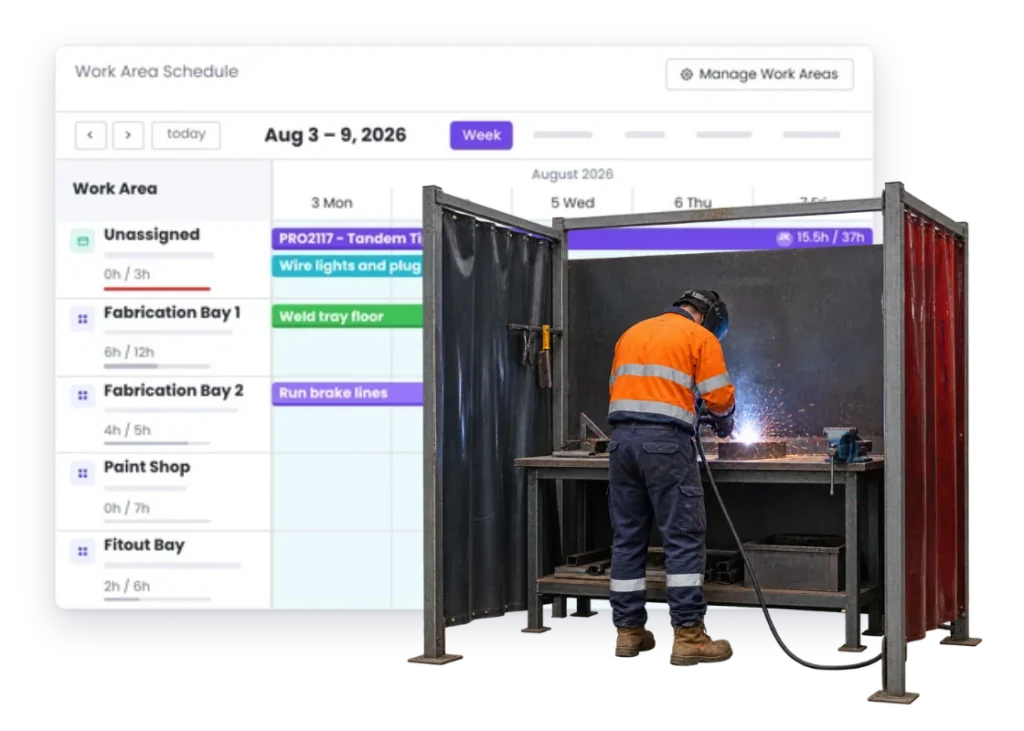
Overview
Most workshops aren’t one big bucket of work.
Cutting is different to fabrication. Fabrication is different to paint. Paint is different to assembly. Site work is somewhere else again.
Work Areas let you organise the work around the parts of the business that actually do it.
That makes it easier to see what’s waiting, what’s underway and where the next hold-up is likely to be.
What’s inside
What you get
01
Custom work areas
Set them up around the way your business actually works.
02
Work by area
See the jobs and tasks that belong in each part of the shop.
03
Multiple work areas
Plan jobs that need to move through more than one area.
04
Scheduling connection
Use Work Areas as part of the wider plan for the week.
05
Project connection
The work still points back to the real job and its information.
The reality
Why you need it
Everything is “in progress.”
That doesn’t tell you whether it’s waiting for cutting, sitting in fabrication or ready for paint.
One area gets buried while another has room.
You don’t need more work. You need to know where the work already is.
The job is ready to move, but nobody knows.
It sits there until someone notices.
Work skips around the shop.
A rush job gets pushed through while something else waits.
The schedule doesn’t match the way the shop is set up.
Your team thinks in bays, benches, machines and departments, not one giant calendar.
How it works
How it works
01
Set up the areas that make sense for you
02
Put work where it belongs
03
See what each area has coming
04
Move work when it moves
05
Use the view to plan ahead
Post updated.View Post↗
Capabilities
What it does
Capability
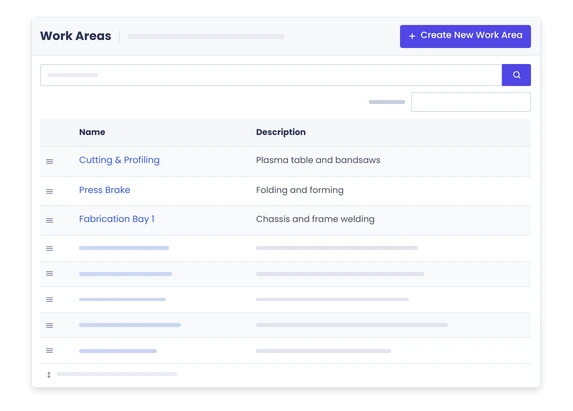
Custom work areas
Set them up around the way your business actually works.
Capability
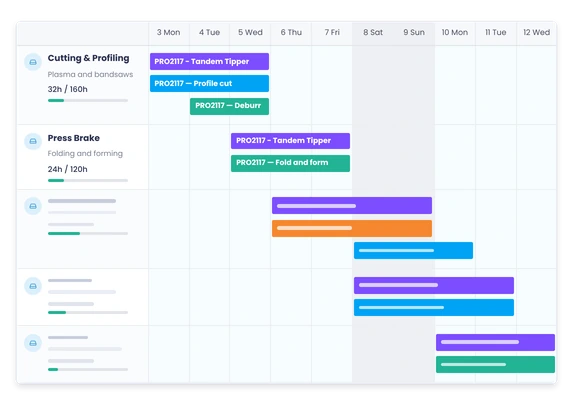
Work by area
See the jobs and tasks that belong in each part of the shop.
Capability
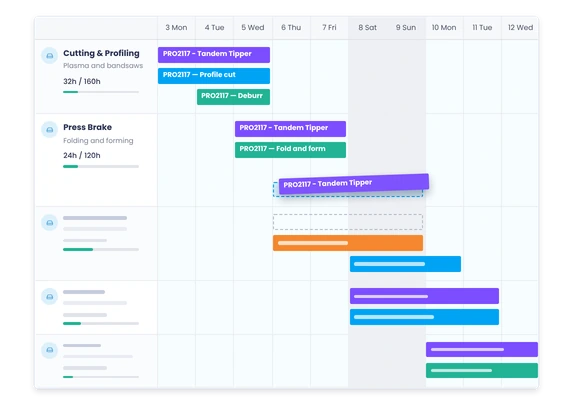
Multiple work areas
Plan jobs that need to move through more than one area.
Scheduling connection
Use Work Areas as part of the wider plan for the week.
Project connection
The work still points back to the real job and its information.
Day to day
What it looks like on a normal day
Fabrication is full. Assembly isn’t.
You can see the pile-up before loading more work into the wrong part of the shop.
A job finishes cutting.
The next area can see it’s ready instead of waiting for someone to walk over and tell them.
A rush job needs to jump the queue.
Move it through the areas it needs without losing sight of what it displaced.
A job is “late.”
Work Areas help answer the more useful question: where is it actually sitting?
What you get out of it
What changes
See where the work really is.
Not just the job status. The part of the shop that has it.
Find the bottleneck faster.
See where work is starting to stack up.
Make handovers clearer.
The next area knows what’s coming.
Plan around the shop you actually have.
Use the real work areas, not a generic schedule that ignores how the place runs.
Keep jobs moving.
Less sitting around between one part of the job and the next.
-
Discovered their contract work wasn’t profitable.
We didn’t wanna pay 100 grand upfront for a program – but then we found WorkGuru.
Nick Mazzella, Administrator, Frontline Trays & Trailers
Fit
Will it work the way we do things?
“Our shop doesn’t have formal departments.”
It doesn’t need them. A Work Area can be whatever makes sense to your team: cutting, Bay 2, paint, site, assembly or something else.
“Jobs move backwards sometimes.”
That happens. Rework is still work. Move the job where it actually needs to go.
“Different jobs use different areas.”
Good. Use the areas that job actually needs.
“We’re not a factory.”
You don’t need to be. If work moves between different parts of the business, Work Areas can still make that easier to see.
By trade
Where this gets used
Works with
Connected features
Scheduling
Plan when the work needs to happen.
Task Management
Break the job into the work that belongs in each area.
Resource Scheduling
See who is needed in each area.
Project Management
Keep the work areas tied back to the job.
Automations
Notify the next people when work is ready to move.
FAQs
Work Areas questions
What is a Work Area?
A Work Area is a way to organise work around the part of the business where it gets done.
Can we create our own Work Areas?
Yes. Set them up to match the way your business actually works.
Can one job move through multiple Work Areas?
Yes. That’s often the point – one job can need different parts of the shop at different times.
Do Work Areas work with scheduling?
Yes. They help give the schedule more context around where the work needs to happen.
Are Work Areas only for manufacturing?
No. They can also make sense for repair, field service, installation and other businesses with distinct places or types of work.
See where the work is piling up.
Show us how work moves through your shop.