
Home / Features / Inventory & Stock Control / Stock Control
Inventory & Stock Control
Make the stock count worth checking.
Know what’s on the shelf, what it’s worth and what it cost — in WorkGuru and in your accounting system at the same time.

Overview
The stock number only helps if people believe it.
If you hold stock to use on jobs, build with, or sell, then stock control stops being optional the moment the numbers stop matching. The usual symptoms are familiar: a job held up by something the system said you had, a stock value in the accounts that nobody believes, and a stocktake that turns into an argument.
WorkGuru runs a First-In-First-Out perpetual inventory. Perpetual means stock on hand and stock value move as things happen — when goods are received, used on a job, transferred or adjusted — rather than being worked out at the end of a period. FIFO means each receipt keeps its own cost, so when stock is consumed the job is costed at what that stock actually cost you.
That combination is what makes the job cost and the balance sheet agree. Materials get costed at real prices instead of a standing average, and the stock value in WorkGuru lines up with your accounting integration instead of needing a reconciliation nobody enjoys.
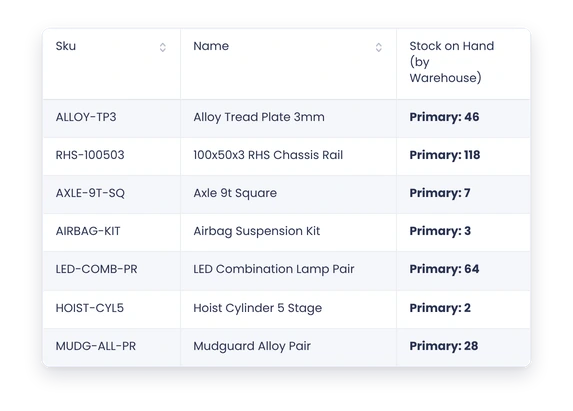
Around that sit the ordinary day-to-day tools: stock on hand by location, stock takes for counting, adjustments for the things counts turn up, and transfers for moving stock between warehouses.
What’s inside
What you get
01
On-hand quantities
See what is available now.
02
Receipts
Bring incoming stock into the count.
03
Usage
Reduce stock when it is consumed.
04
Adjustments
Correct differences when the real count changes.
05
Locations
Know where the stock is held.
06
Stocktakes
Check the system against what is physically there.
The reality
Why you need it
The system says you have it and you don’t.
The most expensive sentence in a workshop. A job planned around material that isn’t there costs a day, and it costs trust — after it happens twice, people stop believing the number and start checking the shelf, which means you’re carrying the cost of the system without the benefit.
The stock value in the accounts is a guess.
If stock movements aren’t recorded as they happen, the balance sheet figure is last count plus purchases minus an estimate. That gets reconciled once a year in an uncomfortable conversation, and every job cost in between is carrying the same error.
Jobs look more profitable than they are.
Material drawn from stock and never recorded is cost that stays on your shelf instead of landing on the job. Both numbers end up wrong in the flattering direction, which is the dangerous one — you keep quoting the same work at the same price believing it makes money.
Nobody can tell you what’s actually there.
Not because people are careless, but because the information is spread across a store, a ute, a job in progress and somebody’s memory. One place to look is the whole point.
How it works
How it works
01
Set up what you track
02
Receive what arrives
03
Use what goes out
04
Keep locations current
05
Adjust when reality differs
06
Review low stock
Capabilities
What it does
Capability
On-hand quantities
See what is available now.
Capability
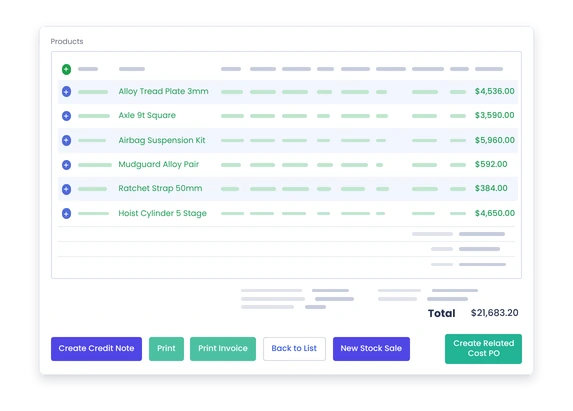
Receipts
Bring incoming stock into the count.
Capability
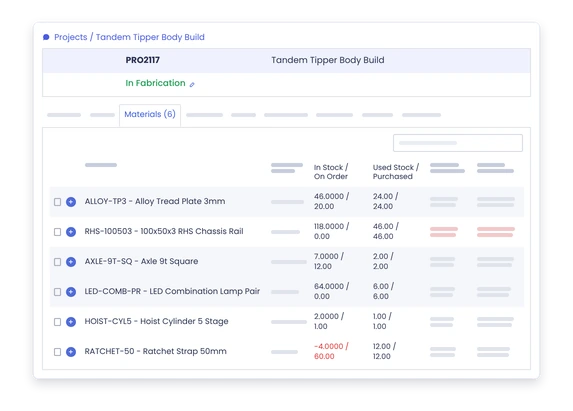
Usage
Reduce stock when it is consumed.
Adjustments
Correct differences when the real count changes.
Locations
Know where the stock is held.
Stocktakes
Check the system against what is physically there.
What you get out of it
What changes
Trust the number more often
Reduce the gap between the shelf and the system.
Spend less time looking
Give people somewhere useful to check first.
Keep material costs cleaner
What leaves stock can follow the job that used it.
Catch shortages sooner
Know what needs replenishment before the next job stalls.
-
Discovered their contract work wasn’t profitable.
We didn’t wanna pay 100 grand upfront for a program – but then we found WorkGuru.
Nick Mazzella, Administrator, Frontline Trays & Trailers
Fit
Will it work the way we do things?
“We are never going to scan every washer.”
Nor should you. The point isn’t total coverage, it’s coverage of the things that hurt. Track the items that stop a job or tie up real money, and let the cheap consumables be consumables. A stock system you actually maintain on 200 items beats one you abandoned on 2,000.
“Our team will forget to record things.”
Some of the time, yes. That’s why stock movements are attached to work people are already doing — receiving a purchase order, using material on a job — rather than being a separate task at the end of the day. The more the recording is a by-product of the work, the less it depends on anyone remembering.
“The count will never be perfect.”
It won’t, and it doesn’t need to be. The useful question isn’t whether the number is exact, it’s whether it’s close enough to trust when you’re deciding if a job can start. Stock takes and adjustments exist because reality drifts — the system is built to be corrected, not to be perfect.
“Most stock is cheap.”
Individually, usually. The cost of cheap stock is rarely the stock — it’s the job that stopped because a $4 item wasn’t there, or the four trips to the supplier that week. Equally, it’s a reason not to track everything: put the effort where the delay or the money actually is.
By trade
Where this gets used
Works with
Connected features
Product Management
Keep the item setup behind the stock.
Stock Locations
See where the quantity is held.
Stock on Projects
Put usage against the job.
Stocktakes
Check the count and correct the gaps.
Purchasing
Bring new stock in when it needs replenishing.
FAQs
Stock Control questions
What does stock control software actually track?
What you hold, where you hold it, what it’s worth, and how it moved. Stock on hand by location, the receipts that brought it in, the jobs and production that consumed it, and the adjustments and transfers in between. Because the inventory is perpetual, those figures update as the movements happen.
Can stock usage be linked to job costing?
Yes, and it’s the main reason to bother. Stock used on a project is costed to that project at what the stock actually cost, using FIFO. That means the material cost on the job is a real number rather than an estimate, which is what makes the finished job cost worth comparing to what you quoted.
How often should stock counts be adjusted?
There’s no universal answer — it depends on how fast your stock moves and how much it’s worth. The practical version is to count the high-value and fast-moving items often enough that you trust them, and everything else less often. Adjustments exist so you can correct what a count finds without unpicking history.
Can stock control work for small workshops?
Yes, and small workshops often get more out of it, because there’s less slack to absorb a missing item. Start with the items that stop work or tie up cash. Scope is a decision you make, not something the system imposes.
Does stock control replace purchasing?
No — they work together. Purchasing is how stock arrives and what it cost; stock control is what you hold and what happens to it afterwards. Receiving a purchase order is the point where one becomes the other.
Can I keep stock in more than one place?
Yes. Stock is tracked per location, so multiple warehouses or stores each show their own stock on hand, and you can transfer between them. Knowing the total isn’t much use if the material is at the wrong site.
Make the stock number useful again.
Bring us a few of the items your team regularly looks for and we will show you how the stock trail can work.