
Home / Features / Inventory & Stock Control / Stock Shortages & Par Levels
Inventory & Stock Control
See what is running low before it runs out.
Set sensible stock levels for the items you rely on and make shortages visible while there is still time to buy more.
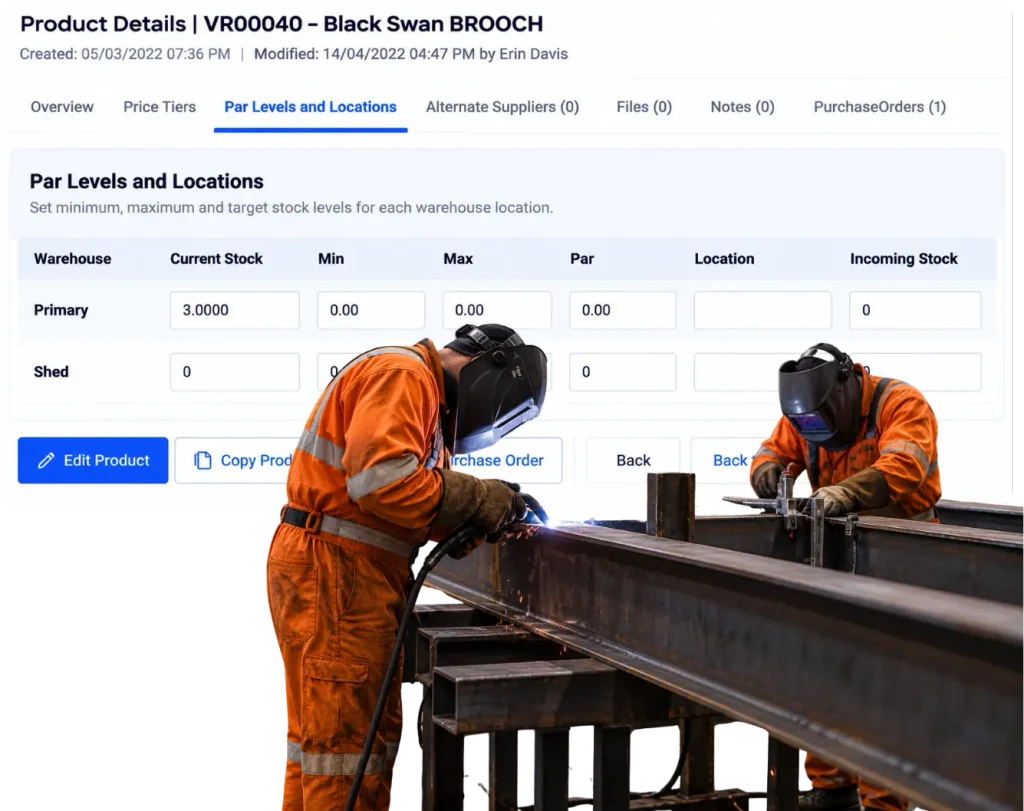
Overview
Know what is getting low before someone reaches for an empty shelf.
The worst time to notice a shortage is when the job needs the part.
A par level is not complicated. It is simply the point where an item deserves attention.
For the common stock that keeps jobs moving, WorkGuru can help make low levels visible before the shelf is empty and the purchasing turns urgent.
What’s inside
What you get
01
Par levels
Set the stock level that should trigger attention.
02
Shortage visibility
See which products need replenishment.
03
Stock on hand
Use the current available quantity behind the warning.
04
Purchasing connection
Turn a shortage into a replenishment decision.
05
Product-level settings
Use different levels for different items.
06
Ongoing review
Change the setting as usage changes.
How it works
How it works
01
Choose the items that matter
02
Set a sensible level
03
Keep the stock current
04
Watch for shortages
05
Create the replenishment
06
Review the level
Capabilities
What it does
Capability
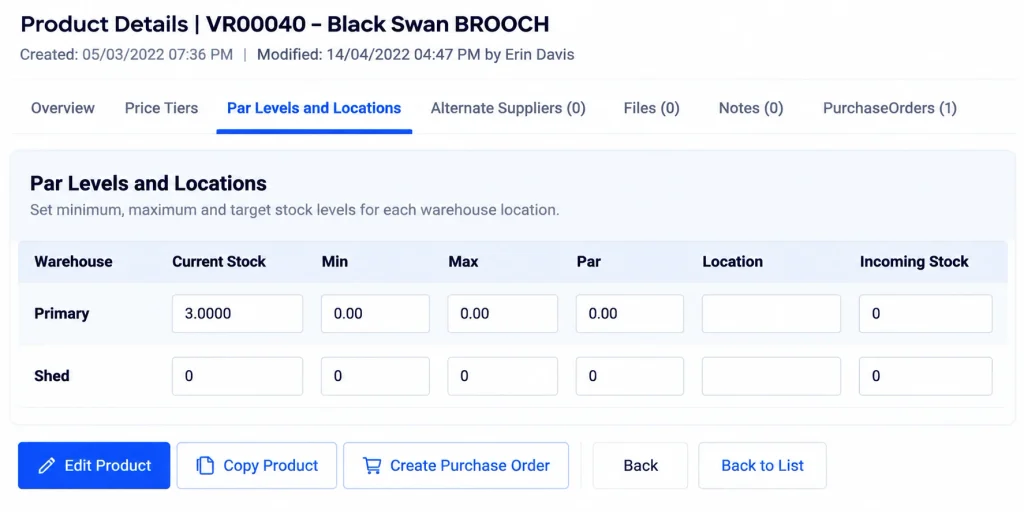
Par levels
Set the stock level that should trigger attention.
Capability
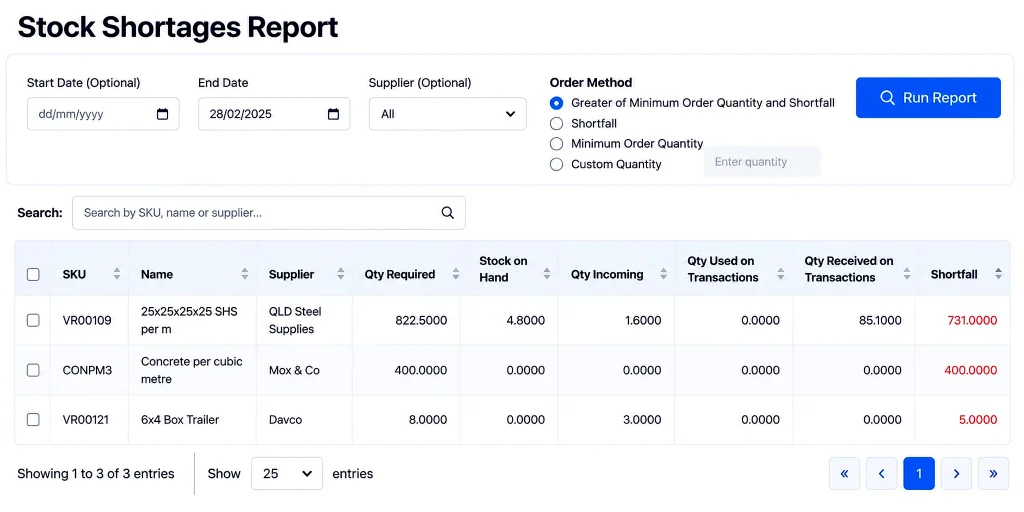
Shortage visibility
See which products need replenishment.
Capability
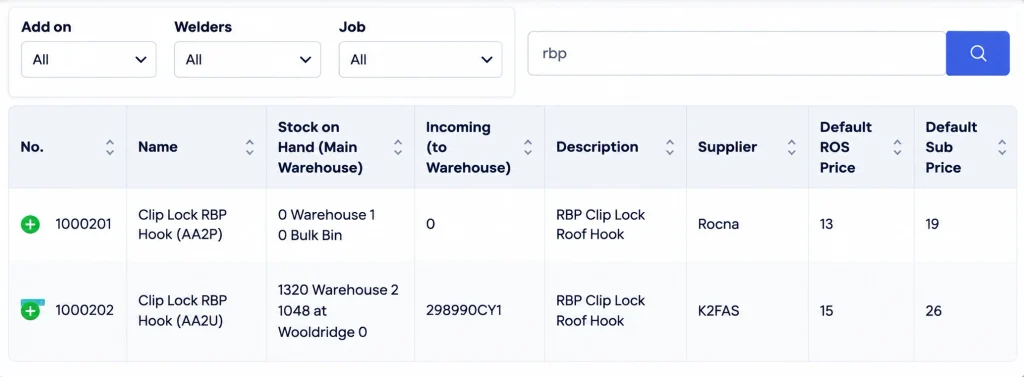
Stock on hand
Use the current available quantity behind the warning.
Purchasing connection
Turn a shortage into a replenishment decision.
Product-level settings
Use different levels for different items.
Ongoing review
Change the setting as usage changes.
What you get out of it
What changes
Buy before the shortage hurts
Give purchasing time to act normally.
Reduce emergency orders
Stop discovering repeat shortages at the last minute.
Hold stock more deliberately
Use different levels for different items.
Make replenishment less person-dependent
Put the warning somewhere the team can see it.
-
Discovered their contract work wasn’t profitable.
We didn’t wanna pay 100 grand upfront for a program – but then we found WorkGuru.
Nick Mazzella, Administrator, Frontline Trays & Trailers
Fit
Will it work the way we do things?
“Demand is too unpredictable.”
Then use par levels only for the repeat items where there is enough pattern to make a warning useful.
“We do not want to carry more stock.”
The goal is not more stock. It is a more deliberate level for the items that matter.
“Someone already watches the shelves.”
Good. Par levels make that knowledge easier to share.
“Our supplier is next door.”
Then your level can be lower. The right setting depends on how quickly you can replenish.
By trade
Where this gets used
Works with
Connected features
Stock Control
Use current quantities behind the shortage view.
Stock Purchasing
Replenish the inventory that is running low.
Product Management
Set the controls around individual items.
Automations
Trigger reminders or actions from low-stock conditions where configured.
FAQs
Stock Shortages & Par Levels questions
What is a stock par level?
It is a minimum or target stock level used to show when an item should be reviewed for replenishment.
How do par levels help prevent shortages?
They make low stock visible before the available quantity reaches zero and a job has to wait.
Should every product have a par level?
No. Use them for the repeat items where running out or overstocking actually matters.
Can par levels be changed as usage changes?
Yes. Review and adjust them when real demand shows the existing level no longer makes sense.
Do par levels automatically mean we should buy?
They are a warning or planning signal. The business still decides whether, when and how much to order.
Can low-stock warnings work with purchasing workflows?
Yes. Shortage information can feed into the replenishment and approval process where configured.
Stop finding out when the shelf is empty.
Show us the items you are always running short of and we will show you how to make the warning come earlier.