
Home / Features / Sales & CRM / Quote Management
Sales & CRM
Do not lose the quote after you send it.
Keep sent, open, accepted and lost quotes visible so the work after “Send” does not rely on memory.

Overview
Sending the quote is not the end of quoting.
The customer might open it today, ask a question next week, change the scope, sit on it for a month or accept it tomorrow.
Quote Management is about keeping those open quotes visible while the customer decides – and keeping the next action from disappearing.
What’s inside
What you get
01
Open quote visibility
See what is waiting on a customer decision.
02
Quote status
Know what is current and what has been resolved.
03
Quote revisions
Keep changes around the same opportunity.
04
Client connection
Keep the quote with the customer.
05
Follow-up
Keep the next sales action visible.
06
Quote-to-project handover
Carry won work into delivery.
The reality
Why you need it
The quote was sent.
Everyone moves on to the next thing.
The customer said they would come back next week.
Three weeks pass.
There are several versions of the same quote.
Someone needs to know which one is current.
A quote is dead but still looks open.
Now the sales picture is full of work that is not real.
The customer accepts it.
The delivery team needs the right version and scope.
How it works
How it works
01
Create and send the quote
02
Keep it visible while it is open
03
Update it when the scope changes
04
Follow it up
05
Close the result
06
Move won work forward
Capabilities
What it does
Capability
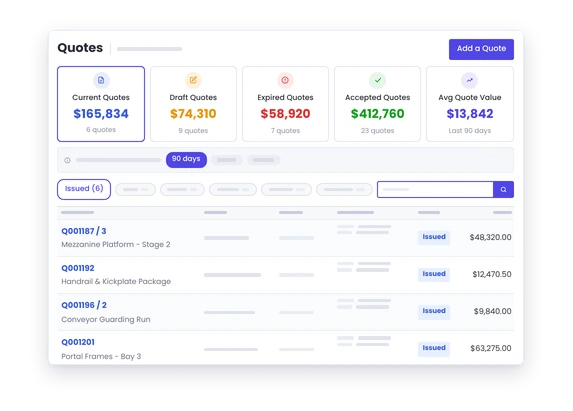
Open quote visibility
See what is waiting on a customer decision.
Capability
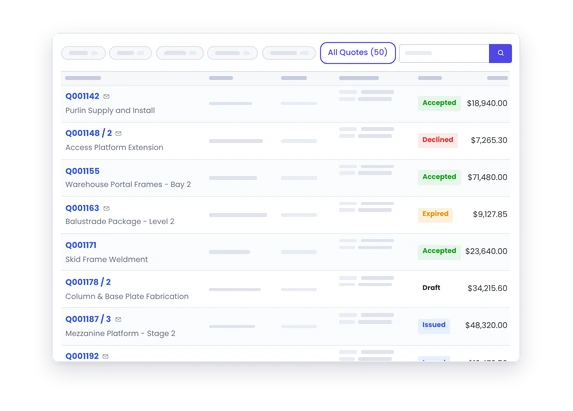
Quote status
Know what is current and what has been resolved.
Capability
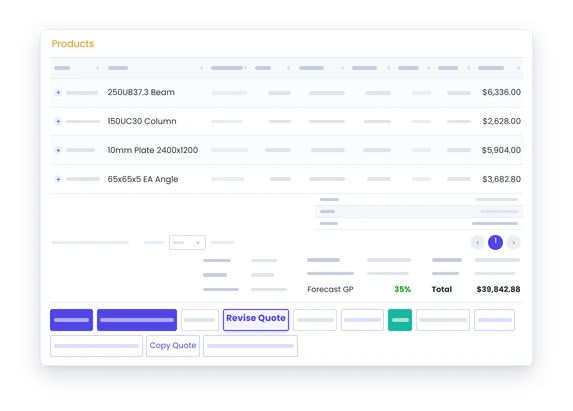
Quote revisions
Keep changes around the same opportunity.
Client connection
Keep the quote with the customer.
Follow-up
Keep the next sales action visible.
Quote-to-project handover
Carry won work into delivery.
Day to day
What it looks like on a normal day
You have twelve quotes out.
See which ones still need an answer instead of checking sent emails.
A customer asks for a scope change.
Update the quote and keep the current version with the opportunity.
A quote has been sitting for a month.
Follow it up or close it. Either answer is more useful than leaving it forever.
The customer says yes.
Move from accepted quote to project without rebuilding the job commercially.
What you get out of it
What changes
Know what is still open.
See which quotes need attention.
Keep the sales picture cleaner.
Close the work that is no longer real.
Keep scope changes straight.
Know what the customer actually accepted.
Hand won work over better.
Give the project the right commercial starting point.
Stop relying on sent mail.
Manage the quote as part of the sales workflow.
-
Discovered their contract work wasn’t profitable.
We didn’t wanna pay 100 grand upfront for a program – but then we found WorkGuru.
Nick Mazzella, Administrator, Frontline Trays & Trailers
Fit
Will it work the way we do things?
“Customers can take months to decide.”
That is exactly when open-quote visibility matters.
“We revise quotes all the time.”
Keep the opportunity current instead of treating every change like a completely separate sale.
“We do not want to annoy customers with follow-up.”
Following up does not mean pestering them. It means deciding when a quote genuinely needs another conversation.
By trade
Where this gets used
Works with
Connected features
Quoting
Build the proposal.
Sales Pipeline
See open quotes in the wider opportunity picture.
Client Follow-Up
Keep the next call or email moving.
Project Management
Take accepted work into delivery.
Automations
Automate repeat follow-up where it helps.
FAQs
Quote Management questions
Can we see quotes that are still open?
Yes.
Can quotes be updated if the scope changes?
Yes.
Can we record whether a quote was won or lost?
Keeping the outcome current is part of useful quote management.
Can a won quote move into a project?
Yes. That connection is a key part of the WorkGuru workflow.
Know which quotes still need an answer.
See how WorkGuru keeps quoting visible after the quote leaves your inbox.